
Instrument brightness control
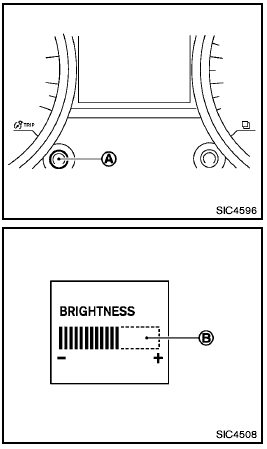
The instrument brightness control operates
when the headlight switch is in the  or
or  position.
Turn the control A to adjust the brightness of the meter panel and the instrument panel lights.
The brightness indicator B will be shown briefly in the vehicle information display when the control is turned.
When the brightness level reaches the maximum or minimum, a beep will sound.
When the brightness level reaches the minimum, the meter panel and the instrument panel lights will be turned off.
After the ignition switch is turned to the OFF position, the brightness indicator B is displayed for 30 seconds.
See also:
Air conditioning system refrigerant and lubricant recommendations
The air conditioning system in your
NISSAN vehicle must be charged with the
refrigerant HFC-134a (R-134a) and the oil,
NISSAN A/C system oil Type S or the exact
equivalents.
The use of an ...
Shift lock release
Shift lock release
If the battery is discharged, the shift selector may
not be moved from the P (Park) position even with
the brake pedal depressed.
To move the shift selector, release the shi ...
Owner's Manual/Service Manual order information
A genuine NISSAN Service Manual is the best
source of service and repair information for your
vehicle. Filled with wiring diagrams, illustrations
and step-by-step diagnostic and adjustment proce ...