
Compass (if so equipped)
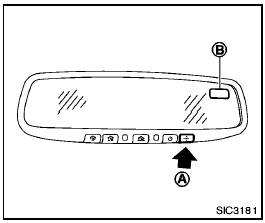
When the ignition switch is turned to the ON position, the compass display B will indicate the direction of the vehicle’s heading.
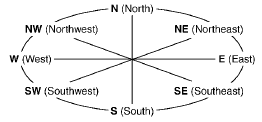
If the display reads “C”, calibrate the compass by driving the vehicle in 3 complete circles at less than 5 MPH (8 km/h). You can also calibrate the compass by driving your vehicle on your everyday route. The compass will be calibrated once it has tracked 3 complete circles.
To turn on and off the compass manually, push
the  switch
A while the ignition switch is in
the ON position.
switch
A while the ignition switch is in
the ON position.
See also:
Cruise main switch indicator
light
The light comes on when the cruise control main
switch is pushed. The light goes out when the
main switch is pushed again. When the cruise main switch indicator light comes
on, the cruise
contr ...
Precautions on supplemental restraint system
This Supplemental Restraint System (SRS) section
contains important information concerning
the following systems:
● Driver and passenger supplemental frontimpact
air bag (NISSAN Advanced ...
Fuses
Two types of fuses are used. Type (A) is used in
the fuse boxes in the engine compartment. Type
(B)- is used in the passenger compartment fuse
box.
Type A fuses are provided as spare fuses. ...