
CD/DVD
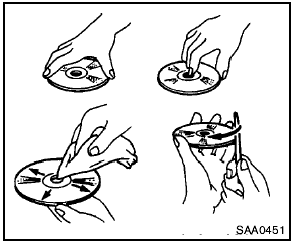
- Handle a CD/DVD by its edges. Never touch the surface of the disc. Do not bend the disc.
- Always place the discs in the storage case when they are not being used.
- To clean a disc, wipe the surface from the center to the outer edge using a clean, soft cloth. Do not wipe the disc using a circular motion.
Do not use a conventional record cleaner or alcohol intended for industrial use.
- A new disc may be rough on the inner and outer edges. Remove the rough edges by rubbing the inner and outer edges with the side of a pen or pencil as illustrated.
See also:
Music Box Hard Drive audio system without Navigation System (if so
equipped)
The Music Box Hard Drive audio system can
store songs from CDs being played. The system
has an 800 megabyte (MB) storage capacity and
can record up to 24 hours (approximately 360
songs).
The ...
Accelerator downshift
— in D position —
For passing or hill climbing, depress the accelerator
pedal to the floor. This shifts the transmission
down into a lower gear, depending on the
vehicle speed.
High fluid tem ...
Seats
SEATS
WARNING:
- Do not ride in a moving vehicle when
the seatback is reclined. This can be
dangerous. The shoulder belt will not
be against your body. In an accident,
you could be thrown ...