
Recent Calls
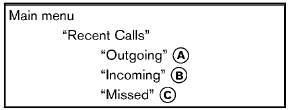
Use the Recent Calls command to access outgoing, incoming or missed calls.
“Outgoing” A
Use the Outgoing command to list the outgoing calls made from the vehicle.
“Incoming” B
Use the Incoming command to list the incoming calls made from the vehicle.
“Missed” C
Use the Missed command to list the missed calls made to the vehicle that were not answered.
See also:
Engine compartment
CAUTION:
Never use a fuse of a higher or lower
amperage rating than specified on the
fuse box cover. This could damage the
electrical system or cause a fire.
If any electrical equipment does ...
Ball mount
The hitch ball is attached to the ball mount and
the ball mount is inserted into the hitch receiver.
Choose a proper class ball mount based on the
trailer weight. Additionally, the ball mount sho ...
Glass
When cleaning the rear window, it may be easier
to clean if the high-mounted stop light (if so
equipped) is removed first.
Be careful when removing the high-mounted
stop light to reduce the r ...