
Heater and air conditioner (automatic) (Type A)
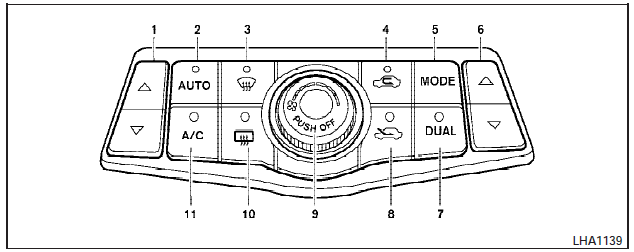
1. Temperature control buttons (drivers
side)
2. AUTO climate control ON button
3.  (front defroster) button
4.
(front defroster) button
4.  Air recirculation button
5. MODE (manual air flow control) button
6. Temperature control buttons (passenger
s side)
7. DUAL (passenger side temperature
control) ON/OFF button
8.
Air recirculation button
5. MODE (manual air flow control) button
6. Temperature control buttons (passenger
s side)
7. DUAL (passenger side temperature
control) ON/OFF button
8.  Fresh air intake button
9.
Fresh air intake button
9.  (fan speed control) dial/OFF
button
10.
(fan speed control) dial/OFF
button
10.  (rear window defroster)
button
11. A/C (air conditioner) ON/OFF button
(rear window defroster)
button
11. A/C (air conditioner) ON/OFF button
WARNING:
- The air conditioner cooling function operates only when the engine is running.
- Do not leave children or adults who would normally require the assistance of others alone in your vehicle. Pets should also not be left alone. They could accidentally injure themselves or others through inadvertent operation of the vehicle. Also, on hot, sunny days, temperatures in a closed vehicle could quickly become high enough to cause severe or possibly fatal injuries to people or animals.
- Do not use the recirculation mode for long periods as it may cause the interior air to become stale and the windows to fog up.
Start the engine and operate the controls to activate the air conditioner.
See also:
Automatic anti-glare rearview mirror
The inside mirror is designed so that it automatically
dims during night time conditions and according
to the intensity of the headlights of the
vehicle following you. The automatic anti-glare
...
Safety
The Nissan Rogue gets top safety marks. It was named a 2009 Top Safety Pick
by the Insurance Institute for Highway Safety. To receive this award, a car must
earn the top rating of Good in frontal, ...
Top tether anchor point locations
The child restraint top tether strap must be used
when installing the child restraint with the LATCH
lower anchor attachments or seat belts. See “Installing
top tether strap” later in this se ...