
Ending a call
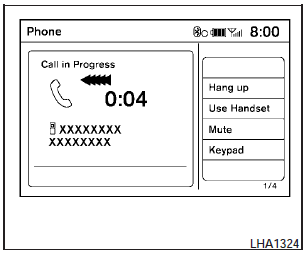
To finish the call, perform one of the following procedures:
- Select the Hang up key on the Call in Progress display.
- Push the  switch on the steering
wheel.
switch on the steering
wheel.
- When the Call in Progress screen is displayed, press the PHONE button on the instrument panel to hang up. If any other screen is currently displayed, press the PHONE button to display the Call in Progress screen first, then press the PHONE button again to hang up.
See also:
Stopping the vehicle
1. Safely move the vehicle off the road and
away from traffic.
2. Turn on the hazard warning flashers.
3. Park on a level surface and apply the parking
brake. Shift the manual transmission into ...
Meters and gauges
Meters and gauges
1. Tachometer
2. Vehicle information display
3. Speedometer
4. Warning/indicator lights
5. Engine coolant temperature gauge
6. switch (twin trip odometer
control and ...
Removing covers from rear parcel shelf
Remove the top tether anchor cover or key cylinder
cover as follows:
1. Lift the cover to the full open position.
2. Rotate the cover in the direction shown,
disengaging the hinge at 1 and sli ...