
Instrument panel
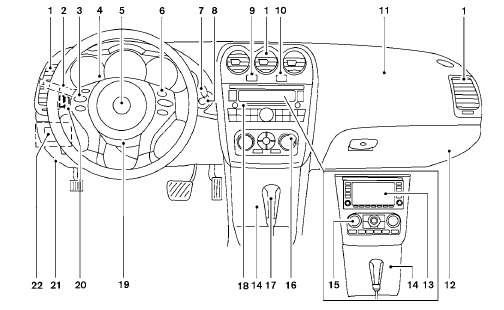
1. Vents (P. 4-18)
2. Headlight/fog light (if so equipped)/turn
signal switch (P. 2-29)
3. Steering wheel switch for audio control
(if so equipped)/Bluetooth Hands-free
Phone System (if so equipped)
(P. 4-96, P. 4-92, P. 4-106)
4. Meters and gauges (P. 2-3)
5. Driver supplemental air bag/horn
(P. 1-41, P. 2-35)
6. Cruise control main/set switch
(P. 5-20)
7. Windshield wiper and washer switch
(P. 2-28)
8. Ignition switch (P. 5-7)
9. Hazard warning flasher switch (P. 2-34)
10. Front passenger air bag status light
(P. 1-52)
11. Front passenger supplemental air bag
(P. 1-41)
12. Glove box (P. 2-41)
13. Navigation system* (if so equipped)
(P. 4-2)
14. Covered storage box (P. 2-42)
15. Heater and air conditioner (automatic)
(P. 4-26)
16. Heater and air conditioner (manual)
(P. 4-19)
17. Shift selector (P. 5-12)
18. Audio system controls (if so equipped)/
Storage (if so equipped)
(P. 4-29, P.2-42)
19. Tilt/telescopic steering wheel controls
(P. 3-28)
20. Vehicle information display controls
(P. 2-17)
21. Hood release (P. 3-23)
22. Trunk opener (P. 3-23)
Vehicle Dynamic Control (VDC) OFF
switch (P. 2-36)
NISSAN Intelligent Key™ port (P. 5-7)
*: Refer to the separate Navigation System Owner’s
Manual (if so equipped).
See the page number indicated in parentheses
for operating details
See also:
NISSAN vehicle immobilizer system
The NISSAN Vehicle Immobilizer system will not
allow the engine to start without the use of the
registered key.
If the engine fails to start using a registered key
(for example, when interferen ...
Starting the vehicle
1. After starting the engine, fully depress the
foot brake pedal before moving the shift
selector out of the P (Park) position.
2. Keep the foot brake pedal depressed and
move the shift selector i ...
Types of tires
WARNING:
- When changing or replacing tires, be
sure all four tires are of the same type
(i.e., Summer, All Season or Snow) and
construction. A NISSAN dealer may be
able to help you with info ...