
Vehicle information display
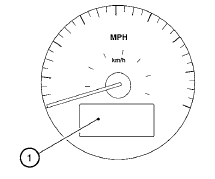
The vehicle information display 1 is located on the bottom of the speedometer. It displays such items as:
● Intelligent Key operation information
● some indicators and warnings
● other information
For details about the Intelligent Key, see “NISSAN Intelligent Key™” in the “Pre-driving checks and adjustments” section.
See also:
Trailer brakes
If your trailer is equipped with a braking system,
make sure it conforms to federal and/or local
regulations and that it is properly installed.
WARNING
Never connect a trailer brake system directl ...
Engine coolant temperature gauge
Engine coolant temperature gauge
The gauge indicates the engine coolant temperature.
The engine coolant temperature is within the
normal range when the gauge needle points
within the zone show ...
Forward-facing child restraint installation using
LATCH
Refer to all Warnings and Cautions in the “Child
safety” and “Child restraints” sections before
installing a child restraint.
Follow these steps to install a forward-facing
child restra ...