
Xenon headlights (if so equipped)
WARNING
HIGH VOLTAGE
● When xenon headlights are on, they
produce a high voltage. To prevent an
electric shock, never attempt to modify
or disassemble. Always have your xenon
headlights replaced at a NISSAN
dealer.
● Xenon headlights provide considerably
more light than conventional headlights.
If they are not correctly aimed,
they might temporarily blind an oncoming
driver or the driver ahead of you and
cause a serious accident. If headlights
are not aimed correctly, immediately
take your vehicle to a NISSAN dealer
and have the headlights adjusted
correctly.
When the xenon headlight is initially turned on, its brightness or color varies slightly. However, the color and brightness will soon stabilize.
● The life of xenon headlights will be shortened by frequent on-off operation. It is generally desirable not to turn off the headlights for short intervals (for example, when the vehicle stops at a traffic signal). Even when the daytime running lights are active (Canada only), the xenon headlights do not turn on. This way the life of the xenon headlights is not reduced.
● If the xenon headlight bulb is close to burning out, the brightness will drastically decrease, the light will start blinking, or the color of the light will become reddish. If one or more of the above signs appear, contact a NISSAN dealer.
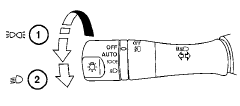
Type A
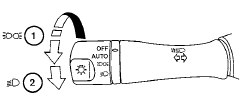
Type B
See also:
Manual control
While using the voice recognition system, it is
possible to select menu options by using the
steering wheel controls instead of speaking voice
commands. The manual control mode does not
allow dial ...
Continuously Variable Transmission (CVT)
WARNING:
- Do not depress the accelerator pedal
while shifting from P (Park) or N (Neutral)
to R (Reverse), D (Drive), Ds (Drive
Sport) or (M) Manual shift mode. Always
depress the brake peda ...
FM/AM radio with compact disc (CD) changer (if so equipped)
For all operation precautions, see "Audio operation
precautions" in this section.
VOL/ON·OFF control:
Place the ignition switch in the ACC or ON
position and push the VOL/ON·OFF cont ...