
Lighting
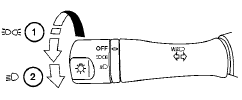
1 When turning the switch to the  position,
the front parking, tail, license plate and
instrument panel lights come on.
position,
the front parking, tail, license plate and
instrument panel lights come on.
2 When turning the switch to the  position,
the headlights come on and all the other
lights remain on.
position,
the headlights come on and all the other
lights remain on.
CAUTION
Use the headlights with the engine running to avoid discharging the vehicle battery.
See also:
Folding front passenger’s seat (if so equipped)
Folding front passenger’s seat (if so
equipped)
The front passenger’s seatback can be folded
down. Some long objects may be loaded in the
vehicle when the rear seats are also folded
dow ...
How to use the back button
Push the BACK button to return
to the
previous screen. ...
NISSAN Vehicle Immobilizer System keys
You can only drive your vehicle using the master
keys which are registered to the NISSAN Vehicle
Immobilizer System components in your vehicle.
The master key can be used for all the locks.
Never ...