
Turn signal switch
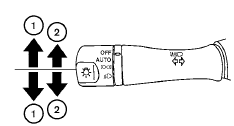
Turn signal
1 Move the lever up or down to signal the turning direction. When the turn is completed, the turn signals cancel automatically.
Lane change signal
2 To signal a lane change, move the lever up or down to the point where the indicator light begins to flash, but the lever does not latch.
See also:
Troubleshooting guide
The system should respond correctly to all voice
commands without difficulty. If problems are encountered,
try the following solutions.
Where the solutions are listed by number, try
each soluti ...
Self-adjusting brakes
Your vehicle is equipped with self-adjusting
brakes.
The front and rear disc-type brakes self-adjust
every time the brake pedal is applied.
WARNING
See a NISSAN dealer for a brake system
check i ...
Front park/turn/sidemarker light
Bulb replacement requires the removal of the
headlight assembly. If replacement is required,
see your NISSAN dealer. ...