
Keys
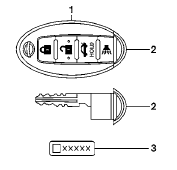
1. Two Intelligent Keys
2. Mechanical keys (inside Intelligent
Keys)
3. Key number plate
See also:
Tilt operation
Tilt operation
Pull the lock lever down 1 and adjust the
steering wheel up or down 2 to the desired
position.
Push the lock lever up 3 securely to lock the
steering wheel in place. A clickin ...
Selecting the correct oil filter
Your new NISSAN vehicle is equipped with a
high-quality genuine NISSAN oil filter. When
replacing, use a genuine NISSAN oil filter or its
equivalent for the reason described in “Change
inter ...
Fuel-filler door
...