
Locking doors
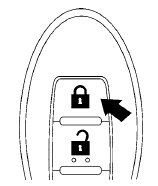
1. Place the ignition switch in the LOCK position.
2. Close all doors.
3. Press the  button on the
Intelligent
Key.
button on the
Intelligent
Key.
4. The hazard warning lights flash twice and
the horn beeps once.
5. All doors will be locked.
CAUTION
After locking the doors using the Intelligent Key, be sure that the doors have been securely locked by operating the door handles.
See also:
Warning lights
Anti-lock Braking
System (ABS)
warning light
When the ignition switch is placed in the ON
position, the Anti-lock Braking System (ABS)
warning light illuminates and then turns off. This
...
Tire pressure
Tire Pressure Monitoring System
(TPMS)
This vehicle is equipped with the Tire
Pressure Monitoring System (TPMS). It
monitors tire pressure of all tires except
the spare. When the low tire pre ...
Latch (Lower Anchors and Tethers for Children) system
Your vehicle is equipped with special anchor
points that are used with Latch (Lower Anchors
and Tethers for CHildren) system compatible
child restraints. This system may also be referred
to as ...