
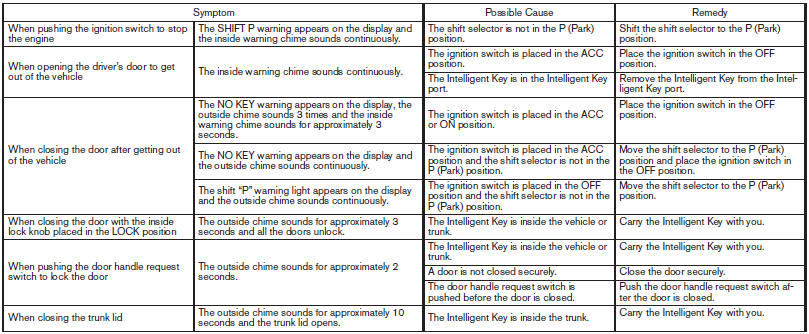
Troubleshooting guide
Verify the location of all Intelligent Keys that are programmed for the vehicle. If another Intelligent Key is in range or inside the vehicle, the vehicle system may respond differently than expected.
See also:
Phone settings
To set up the Bluetooth Hands-Free Phone
System to your preferred settings, press the SETTING
button on the instrument panel and select
the Phone key on the display.
Edit Vehicle Phonebook:
...
Air conditioner specification label (if so
equipped)
The air conditioner specification label is affixed as
shown. ...
Avoiding collision and rollover
WARNING
Failure to operate this vehicle in a safe
and prudent manner may result in loss of
control or an accident.
Be alert and drive defensively at all times. Obey
all traffic regulations. Avoid ...