
Unlocking doors
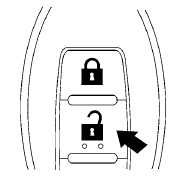
1. Press the  button on the
Intelligent
Key.
button on the
Intelligent
Key.
2. The hazard warning lights flash once.
3. Press the button again within
5 seconds
to unlock all doors.
All doors will be locked automatically unless one
of the following operations is performed within 1
minute after pressing the button:
● Opening any doors.
● Pushing the ignition switch.
The interior light illuminates for 15 seconds when a door is unlocked and the room light switch is in the DOOR position.
The light can be turned off without waiting for 15 seconds by performing one of the following operations:
● Placing the ignition switch in the ON position.
● Locking the doors with the Intelligent Key.
● Switching the room light switch to the OFF
position.
See also:
Treadwear
The treadwear grade is a comparative rating
based on the wear rate of the tire when tested
under controlled conditions on a specified
government test course. For example, a tire
graded 150 wou ...
Air bags, seat belts and child restraints
1. Top tether strap anchor (P. 1-26)
2. Rear seat belts (P. 1-13)
3. Roof-mounted curtain side-impact
supplemental air bag (P. 1-41)
4. Front seat-mounted side-impact
supplemental air bag (P. 1 ...
Capacities and recommended fuel/lubricants
The following are approximate capacities. The actual refill capacities may
be slightly different. When refilling, follow the procedure
described in the “Maintenance and do-it-yourself” section ...