
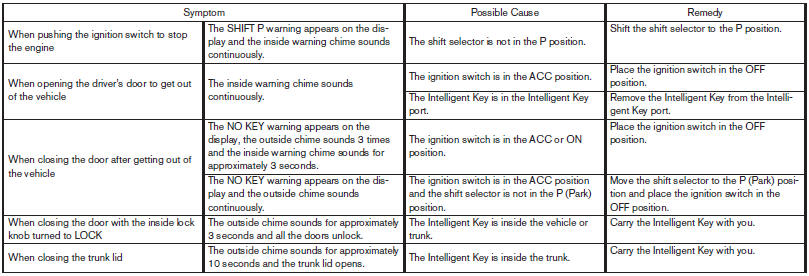
Troubleshooting guide
Verify the location of all Intelligent Keys that are programmed for the vehicle. If another Intelligent Key is in range or inside the vehicle, the vehicle system may respond differently than expected.
See also:
Replacing wheels and tires
When replacing a tire, use the same size, tread
design, speed rating and load carrying capacity
as originally equipped. (See “Specifications” in
the “9. Technical and consumer informationâ ...
Vehicle security system (if so equipped)
The vehicle security system provides visual and
audible alarm signals if someone opens the doors
when the system is armed. It is not, however, a
motion detection type system that activates when ...
Locking doors
Locking doors
1. Move the shift selector to the P (Park) position,
place the ignition switch in the LOCK
position and make sure you carry the Intelligent
Key with you.
2. Close all doors.
3. Pus ...