
Backing up behind a projecting object
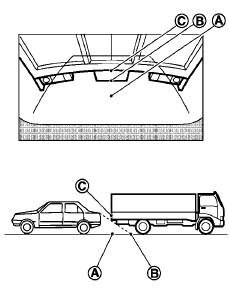
The position C is shown farther than the position B in the display. However, the position C is actually at the same distance as the position A . The vehicle may hit the object when backing up to the position A if the object projects over the actual backing up course.
See also:
Audio main operation
VOL/ON·OFF control:
Place the ignition switch in the ACC or ON
position and push the VOL/ON·OFF control knob
while the system is off to call up the mode (radio,
CD, AUX, USB or iPod ) that wa ...
Comfort Levels
I remember finding our 2009 Cube 1.8 S' driver's seat rather uncomfortable.
The 2010's seemed better, though it doesn't appear to be different, aside from
the fabric. Another editor, who took the ...
Receiving a call
When you hear the ring tone, press the
button on the steering wheel.
Once the call has ended, press the
button
on the steering wheel.
NOTE:
If you do not wish to take the call when you
hear ...