
Call volume
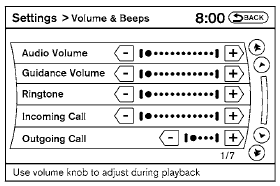
Adjusting the incoming or outgoing call volume may improve clarity if reception between callers is unclear.
● Incoming call—adjusting this setting allows you to hear a difference in volume.
● Outgoing call—adjusting this setting allows the person you are talking with to hear a difference in volume.
To access the settings, press the SETTING button, then select “Volume & Beeps”.
You can also adjust the volume of an incoming voice during a call by pushing the volume control switch on the steering wheel or by turning the volume control knob on the instrument panel.
See also:
Break-in schedule
During the first 1,200 miles (2,000 km),
follow these recommendations to obtain
maximum engine performance and
ensure the future reliability and economy
of your new vehicle. Failure to
f ...
Tire Pressure Monitoring System (TPMS)
This vehicle is equipped with the Tire Pressure
Monitoring System (TPMS). It monitors tire pressure
of all tires except the spare. When the low
tire pressure warning light is lit, and the CHECK
TI ...
Specifications. Engine
This spark ignition system complies with the Canadian standard ICES-002. ...