
Voice recognition settings
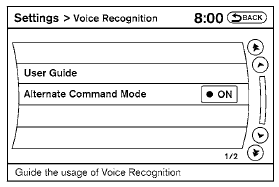
The available settings of the NISSAN Voice Recognition system are described.
1. Select “Voice Recognition”.
2. You can confirm the page by scrolling the screen.
See also:
Interior
The Nissan Maxima's interior is as pronounced and edgy as its exterior.
However, it felt a little too masculine for my taste. There are a lot of dark
gray materials on the inside. It's accented wi ...
2010 Nissan Rogue review
The 2010 Nissan Rogue is the little brother of the Nissan Murano crossover, a
vehicle that I used to own. The Rogue's distinguishable look has been around
since 2008, and it still looks interestin ...
Cup holders
Front - Type A
Front - Type B
To open the front cup holders, push the cup
holder lid. To close, lower the cup holder lid and
push down until it clicks in place.
The plastic insert (if ...