
Giving voice commands
1. Press the  switch located on
the steering
wheel.
switch located on
the steering
wheel.
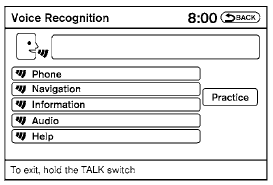
2. A list of commands appears on the screen, and the system announces, “Would you like to access Phone, Navigation, Information, Audio or Help?”
3. After the tone sounds and the icon on the
screen changes from  to
to
 , speak
a command.
, speak
a command.
4. Continue to follow the voice menu prompts and speak after the tone sounds until your desired operation is completed.
See also:
Trunk light
The light illuminates when the trunk lid is opened.
When the trunk lid is closed, the light goes off.
For bulb replacement procedures, refer to “Exterior
and interior lights” in the “Mainten ...
Grocery hooks (if so equipped)
Grocery hooks (if so equipped)
The grocery hooks are located in the trunk and
can be used to hang a standard size plastic
grocery bag.
Do not apply a total load of more than 20
lbs (9 kg ...
Overview
Nissan held the European unveiling of the all-new Nissan Cube at its London,
England, based European design headquarters. The car will go on sale in the
primary markets of Western Europe in late 2 ...