
Troubleshooting guide
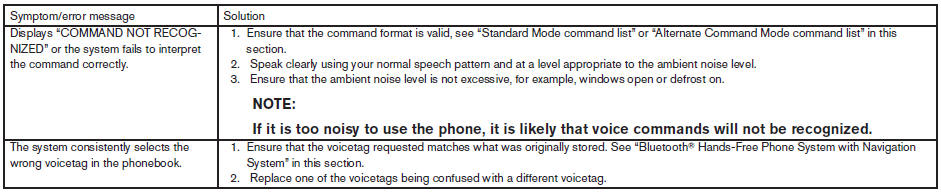
The system should respond correctly to all voice commands without difficulty. If problems are encountered, follow the solutions given in this guide for the appropriate error.
Where the solutions are listed by number, try each solution in turn, starting with number one, until the problem is resolved.
See also:
Battery
- Keep the battery surface clean and dry.
Clean the battery with a solution of baking
soda and water.
- Make certain the terminal connections are
clean and securely tightened.
- If the vehicle ...
Manual operation
Fan speed control
Turn the fan speed control
dial to manually
control the fan speed.
Push the AUTO button to return to automatic
control of the fan speed.
Air recirculation
Push the air reci ...
Clutch fluid (if so equipped)
Check the clutch fluid level in the reservoir
(manual transmissions only). Add Genuine
NISSAN Super Heavy Duty Brake Fluid or
equivalent DOT 3 fluid up to the MAX line A . If
fluid must be a ...