
Changing engine oil filter
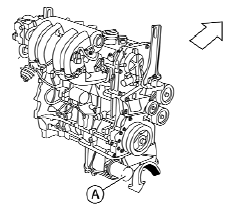
QR25DE
1. Park the vehicle on a level surface and apply
the parking brake.
2. Turn the engine off.
3. Place a large drain pan under the oil filter A .
4. Loosen the oil filter A with an oil filter
wrench by turning it counterclockwise. Then
remove the oil filter by turning it by hand.
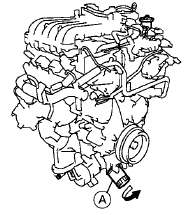
VQ35DE
CAUTION
Be careful not to burn yourself. The engine oil may be hot.
5. Wipe the engine oil filter sealing surface with a clean rag.
CAUTION
Be sure to remove any old gasket material remaining on the sealing surface of the engine. Failure to do so could lead to engine damage.
6. Coat the gasket on the new filter with clean engine oil.
7. Screw on the oil filter until a slight resistance is felt, then tighten an additional 2/3 turn.
8. Start the engine and check for leakage around the oil filter. Correct as required.
9. Turn the engine off and wait more than 10 minutes. Check the oil level. Add engine oil if necessary.
See also:
Interior lights
Do not use for extended periods of time
with the engine stopped. This could
result in a discharged battery. ...
F.M.V.S.S./C.M.V.S.S. certification label
The Federal/Canadian Motor Vehicle Safety
Standard (F.M.V.S.S./C.M.V.S.S.) certification label
is affixed as shown. This label contains valuable
vehicle information, such as: Gross Vehicle
W ...
Installing child restraint LATCH lower anchor
attachments
LATCH webbing-mounted attachment
LATCH compatible child restraints include two
rigid or webbing-mounted attachments that can
be connected to anchors located at certain
seating positions in yo ...