
Control panel buttons — color screen with Navigation System (if so equipped)
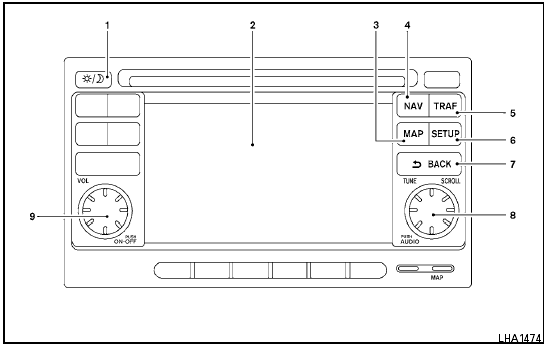
Control panel buttons — color screen with Navigation System (if so equipped)
1.  (brightness control) button
2. Display screen
3. MAP button*
4. NAV button*
5. TRAF button*
6. SETUP button
7.  BACK button
8. TUNE/SCROLL knob
9. Power button/Volume control knob
*For Navigation system control buttons, refer to the separate Navigation System Owner’s Manual.
When you use this system, make sure the engine is running.
If you use the system with the engine not running (ignition ON or ACC) for a long time, it will discharge the battery, and the engine will not start.
Reference symbols:
“Example” — Words marked in quotes refer to a key shown only on the display. These keys can be selected by touching the screen.
See also:
Headlight control switch
Type A
Lighting
1 When turning the switch to the position,
the front parking, tail, license plate and
instrument panel lights come on.
2 When turning the switch to the position,
the headl ...
FM-AM-SAT(if so equipped) radio operation
radio (FM/AM) band select:
Pushing the radio band select button will
change the band as follows:
AM FM1
FM2
AM
radio (SAT) band select (models with
satellite radio):
Pushing the XM b ...
Accessories
Although Nissan Juke has a long list of standard equipment, Nissan has
developed a full range of accessories enabling owners to personalise their cars
still further. Among the items on offer are d ...