
Keyfob (if so equipped)
Keyfob (if so equipped)
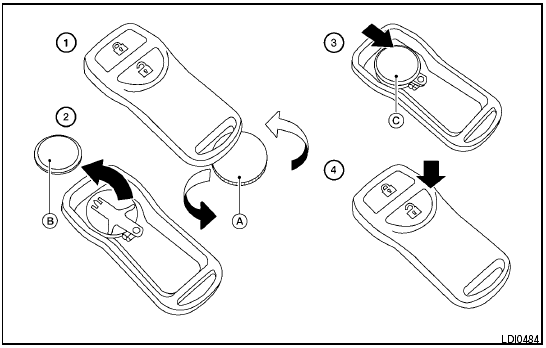
Replace the battery in the keyfob as follows.
1 Open the lid using a coin A .
2 Remove the battery B .
3 Install a new battery C with the “+” facing down.
● Hold the battery by the edges. Holding the battery across the contact points will seriously deplete the storage capacity.
● Do not touch the internal circuit and electric terminals as it could cause a malfunction.
● When changing the battery, do not let dust or oil get on the keyfob.
● There is danger of explosion if a lithium battery is incorrectly replaced. Replace only with the same or equivalent type.
Recommended battery: CR2025 or equivalent.
4 Close the lid securely.
5. Press the  button, then the
 button two or three times to check the keyfob
operation.
button two or three times to check the keyfob
operation.
If the battery is removed for any reason other than replacement, perform step 5.
● An improperly disposed battery can hurt the environment. Always confirm local regulations for battery disposal.
● The keyfob is water-resistant; however, if it does get wet, immediately wipe completely dry.
● The operational range of the keyfob extends to approximately 33 ft (10 m) from the vehicle. This range may vary with conditions.
FCC Notice.
Changes or modifications not expressly approved by the party responsible for compliance could void the user’s authority to operate the equipment.
This device complies with Part 15 of the FCC Rules and RSS-210 of Industry Canada.
Operation is subject to the following two conditions: (1) This device may not cause harmful interference, and (2) this device must accept any interference received, including interference that may cause undesired operation of the device.
See also:
Valet hand-off
When you have to leave a key with a valet, give
them the Intelligent Key itself and keep the mechanical
key with you to protect your belongings.
To prevent the glove box and the trunk from being
o ...
Rear window wiper and washer switch
In freezing temperatures the washer
solution may freeze on the rear window
glass and obscure your vision. Warm
the rear window with the defroster
before you wash the rear window.
- Do ...
Engine cooling system
The engine cooling system is filled at the factory
with a pre-diluted mixture of 50% Genuine
NISSAN Engine Coolant (blue) and 50% water
to provide year-round anti-freeze and coolant
protection. Th ...