
Vehicle information display
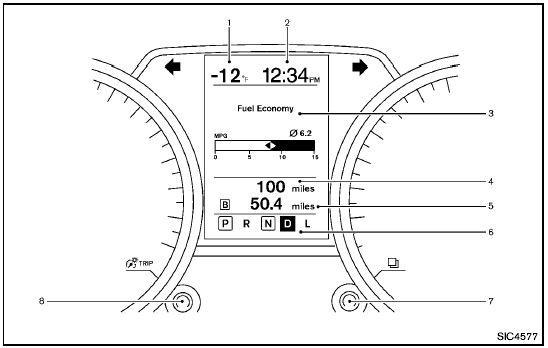
1. Outside temperature
2. Clock
3. Operation indicators and warnings
— Trip computer
— Cruise control
— Settings menu
— Intelligent Key operation*
4. Odometer
5. Twin trip odometer
6. Continuously Variable Transmission (CVT) position indicator
7. switch (settings control and trip computer control)
8. switch (twin trip odometer control and brightness control)
*: if so equipped
See also:
Compact Disc (CD) player
- Do not force a compact disc into the CD
insert slot. This could damage the CD and/
or CD player.
- During cold weather or rainy days, the player
may malfunction due to the humidity. If this ...
Fog light switch (if so equipped)
Fog light switch (if so equipped)
To turn the fog lights on, turn the headlight switch
to the
position, then turn the fog light
switch to the position.
To turn the fog lights off, turn the ...
E-85 fuel
E-85 fuel is a mixture of approximately 85% fuel
ethanol and 15% unleaded gasoline. E-85 can
only be used in a Flexible Fuel Vehicle (FFV). Do
not use E-85 fuel in your vehicle. U.S. government ...