
Bird’s-eye view
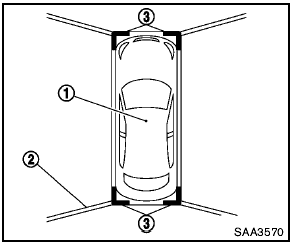
The bird’s-eye view shows the overhead view of the vehicle which helps confirm the vehicle position and the predicted course to a parking space.
The vehicle icon 1 shows the position of the vehicle. Note that the distance between objects viewed in the bird’s-eye view differs from the actual distance.
The areas that the cameras cannot cover 2 are indicated in black.
After the ignition switch is turned on, the nonviewable area 2 is highlighted in yellow for 3 seconds after the bird’s-eye view is displayed.
In addition, the non-viewable corners are displayed in red (blink for the first 3 seconds) 3 to remind the drivers to be cautious.

- Objects in the bird’s-eye view will appear further than the actual distance because the bird’s-eye view is a pseudo view that is processed by combining the views from the cameras on the outside mirrors, the front and the rear of the vehicle.
- Tall objects, such as a curb or vehicle, may be misaligned or not displayed at the seam of the views.
- Objects that are above the camera cannot be displayed.
- The view for the bird’s-eye view may be misaligned when the camera position alters.
- A line on the ground may be misaligned and is not seen as being straight at the seam of the views.
The misalignment will increase as the line proceeds away from the vehicle.
See also:
Lower Anchors and Tethers for CHildren System (LATCH)
LATCH label location
Your vehicle is equipped with special anchor
points that are used with the LATCH (Lower
Anchors and Tethers for CHildren) system
compatible child restraints. This system ...
Moonroof
When power window switch does not
operate
If the power window automatic function (closing
only) does not operate properly, perform the following
procedure to initialize the power window
system:
...
Warning lights
All-Wheel Drive (AWD) warning
light (AWD models)
The light illuminates when the ignition switch is
turned to the ON position. It turns off after the
engine is started.
If the All-Wheel Drive ...