
Front-side view
Front-side view
Guiding lines:
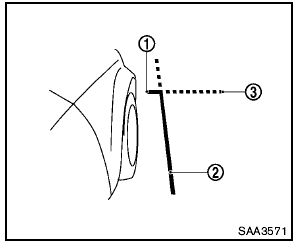
Guiding lines that indicate the width and the front end of the vehicle are displayed on the monitor.
The front-of-vehicle line 1 shows the front part of the vehicle.
The side-of-vehicle line 2 shows the vehicle width including the outside mirror.
The extensions 3 of both the front 1 and side 2 lines are shown with a green dotted line.

- There is a plastic cover over the camera. Do not scratch the cover when cleaning dirt or snow from the cover.
- The turn signal light may overlap with the side-of-vehicle line. This is not a malfunction.
See also:
Headlight control switch
Lighting
Type A
Type B
(1) When turning the switch to the
position,
the front parking, tail, license plate and
instrument panel lights come on.
(2)- When turning the switch to the ...
Exterior
The Pathfinder's styling is considered an evolution of the previous version,
with short overhangs and pronounced fender flares. The rear door handles are
located vertically on the C-pillars, and t ...
Pulling a stuck vehicle
WARNING
To avoid vehicle damage, serious personal
injury or death when recovering a
stuck vehicle:
● Contact a professional towing service
to recover the vehicle if you have any
questions ...