
Recent Calls
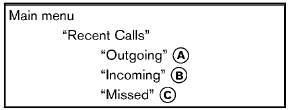
Use the Recent Calls command to access outgoing, incoming or missed calls.
“Outgoing” A
Use the Outgoing command to list the outgoing calls made from the vehicle.
“Incoming” B
Use the Incoming command to list the incoming calls made from the vehicle.
“Missed” C
Use the Missed command to list the missed calls made to the vehicle that were not answered.
See also:
USB (Universal Serial Bus) devices (if so equipped)
This system supports various USB memory
sticks, USB hard drives and iPod® players.
There are some USB devices which may not be
supported with this system.
- Make sure that the USB device is con ...
Safety
Standard features include dual-stage front airbags, seat-mounted side-impact
airbags and side curtain-type airbags. The seat belts have pretensioners and
load limiters. Active head restraints for ...
Measurement of weights
Secure loose items to prevent weight shifts
that could affect the balance of your
vehicle. When the vehicle is loaded, drive
to a scale and weigh the front and the rear
wheels separately to de ...