
Jacking up the vehicle and removing the damaged tire

- Never get under the vehicle while it is supported only by the jack. If it is necessary to work under the vehicle, support it with safety stands.
- Use only the jack provided with your vehicle to lift the vehicle. Do not use the jack provided with your vehicle on other vehicles. The jack is designed for lifting only your vehicle during a tire change.
- Use the correct jack-up points.
Never use any other part of the vehicle for jack support.
- Never jack up the vehicle more than necessary.
- Never use blocks on or under the jack.
- Do not start or run the engine while vehicle is on the jack, as it may cause the vehicle to move.
- Do not allow passengers to stay in the vehicle while it is on the jack.
Carefully read the caution label attached to the jack body and the following instructions.
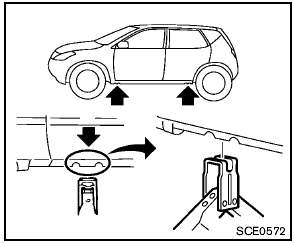
Jack-up point
1. Place the jack directly under the jack-up point as illustrated so the top of the jack contacts the vehicle at the jack-up point.
Align the jack head between the two notches in the front or the rear as shown.
Also fit the groove of the jack head between the notches as shown.
The jack should be used on level firm ground.
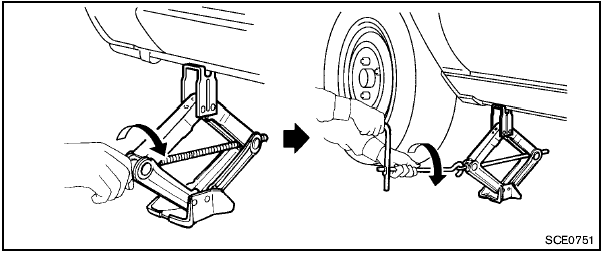
2. Loosen each wheel nut one or two turns by turning counterclockwise with the wheel nut wrench. Do not remove the wheel nuts until the tire is off the ground. 3. To lift the vehicle, securely hold the jack lever and rod with both hands as shown above.
Carefully raise the vehicle until the tire clears the ground. Remove the wheel nuts, and then remove the tire.
See also:
Rear-facing child restraint installation using the seat belts
Rear-facing child restraint installation using the seat belts
WARNING:
The three-point seat belt with Automatic
Locking Retractor (ALR) must be used
when installing a child restraint. Failure ...
Removing bolt-on wheel cover (if so equipped)
Removing bolt-on wheel cover (if so equipped)
Do not use your hands to pry off wheel
caps or wheel covers. Doing so could result
in personal injury.
Wheel cover attachment to the wheel is ...
Starting the vehicle
1. After starting the engine, fully depress the
foot brake pedal before moving the selector
lever out of the P (Park) position.
This CVT is designed so that the foot
brake pedal must be depress ...