
Installing the spare tire
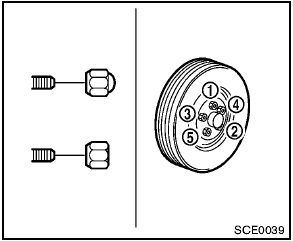
The spare tire is designed for emergency use. (See specific instructions under the heading “Wheels and tires” in the “8.
Maintenance and do-it-yourself” section.)
1. Clean any mud or dirt from the surface between the wheel and hub.
2. Carefully put the spare tire on and tighten the wheel nuts finger tight. Check that all the wheel nuts contact the wheel surface horizontally.
3. With the wheel nut wrench, tighten wheel nuts alternately and evenly in the sequence as illustrated (1 , 2 , 3 , 4 , 5 ), more than 2 times, until they are tight.
4. Lower the vehicle slowly until the tire touches the ground. Then, with the wheel nut wrench, tighten the wheel nuts securely in the sequence as illustrated. Lower the vehicle completely.

- Incorrect wheel nuts or improperly tightened wheel nuts can cause the wheel to become loose or come off.
This could cause an accident.
- Do not use oil or grease on the wheel studs or nuts. This could cause the nuts to become loose.
- Retighten the wheel nuts when the vehicle has been driven for 600 miles (1,000 km) (also in cases of a flat tire, etc.).
- As soon as possible, tighten the wheel nuts to the specified torque with a torque wrench.
Wheel nut tightening torque:
80 ft-lb (108 N·m)
The wheel nuts must be kept tightened to specification at all times. It is recommended that wheel nuts be tightened to specifications at each lubrication interval.
- Adjust tire pressure to the COLD pressure.
COLD pressure:
After the vehicle has been parked for
three hours or more or driven less than
1 mile (1.6 km).
COLD tire pressures are shown on the Tire and Loading Information label affixed to the driver side center pillar.
See also:
Anti-lock Braking System (ABS)
WARNING:
- The Anti-lock Braking System (ABS) is a
sophisticated device, but it cannot prevent
accidents resulting from careless
or dangerous driving techniques. It can
help maintain vehicle ...
Programming HomeLink for Canadian customers
Prior to 1992, D.O.C. regulations required handheld
transmitters to stop transmitting after 2 seconds.
To program your hand-held transmitter to
HomeLink, continue to press and hold the
HomeLink ...
Speaker adaptation (SA) mode
Speaker Adaptation allows up to two out-ofdialect
users to train the system to improve recognition
accuracy. By repeating a number of
commands, the users can create a voice model of
their own ...