
How to read the displayed lines
Lines which indicate the vehicle clearance and distances to objects with reference to the bumper line A are displayed on the monitor.
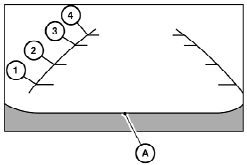
They are indicated as reference distances to objects. The lines and colors in the display indicate distances from the back bumper line A in the illustration.
1 1.5 ft (0.5 m) red
2 3 ft (1 m) yellow
3 7 ft (2 m) green
4 10 ft (3 m) green
The vehicle clearance lines are wider than the actual clearance.
See also:
Operating tips
● Keep the windows and moonroof closed
while the air conditioner is in operation.
● After parking in the sun, drive for 2 or 3
minutes with the windows open to vent hot
air from the pa ...
Capacities and recommended fuel/lubricants
1: For additional information, see “Engine oil” in the “8. Maintenance and
do-it-yourself” section for changing engine oil.
2: For additional information, see “Engine oil and oil filter ...
Three-way catalyst
The three-way catalyst is an emission control
device installed in the exhaust system. Exhaust
gases in the three-way catalyst are burned at
high temperatures to help reduce pollutants.
WARNING
&# ...