
Rear-facing child restraint installation using latch
Refer to all Warnings and Cautions in the Child Safety and Child Restraint sections before installing a child restraint.
Follow these steps to install a rear-facing child restraint using the Latch system:
1. Position the child restraint on the seat. Always follow the child restraint manufacturer s instructions.
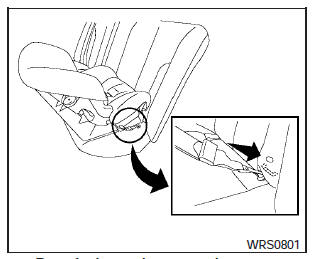
Rear-facing web-mounted step 2
2. Secure the child restraint anchor attachments to the Latch lower anchors. Check to make sure the Latch attachment is properly attached to the lower anchors.
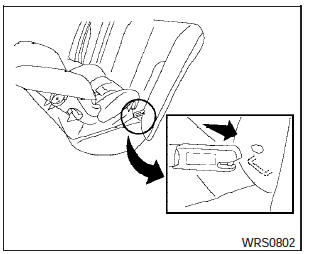
Rear-facing rigid-mounted step 2
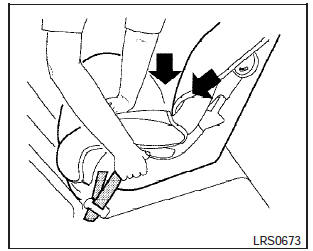
Rear-facing step 3
3. For child restraints that are equipped with webbing-mounted attachments, remove any additional slack from the anchor attachments.
Press downward and rearward firmly in the center of the child restraint with your hand to compress the vehicle seat cushion and seatback while tightening the webbing of the anchor attachments.
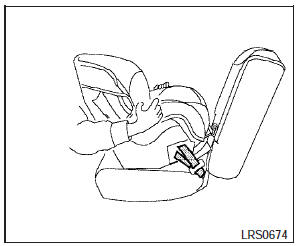
Rear-facing step 4
4. After attaching the child restraint, test it before you place the child in it. Push it from side to side while holding the child restraint near the Latch attachment path. The child restraint should not move more than 1 inch (25 mm), from side to side. Try to tug it forward and check to see if the Latch attachment holds the restraint in place. If the restraint is not secure, tighten the Latch attachment as necessary, or put the restraint in another seat and test it again. You may need to try a different child restraint or try installing by using the vehicle seat belt (if applicable).
Not all child restraints fit in all types of vehicles.
5. Check to make sure the child restraint is properly secured prior to each use. If the child restraint is loose, repeat steps 2 through 4.
See also:
Trailer brakes
If your trailer is equipped with a braking system,
make sure it conforms to federal and/or local
regulations and that it is properly installed.
WARNING
Never connect a trailer brake system directl ...
Moving near a projecting object
The predicted course lines A do not touch the
object in the display. However, the vehicle may
hit the object if it projects over the actual moving
course.
There may be a small distance visi ...
Сhange the display brightness button
To change the display brightness, press
the
button. Pressing the button again will
change the display to the day or the night display.
If no operation is performed within 5 seconds, the
dis ...