
Fog light switch (if so equipped)
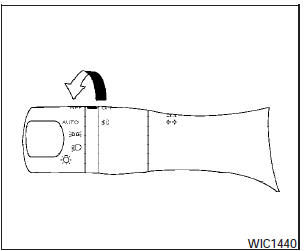
To turn the fog lights on, turn the headlight switch
to the  position, then turn
the fog light
switch to the
position, then turn
the fog light
switch to the  position.
To turn the fog lights on with the headlight switch in
the AUTOposition, the headlights must be on, then
turn the fog light switch to the
 position.
To turn the fog lights off, turn the fog light switch to the OFF position.
The headlights must be on and the low beams selected for the fog lights to operate. The fog lights automatically turn off when the high beam headlights are selected.
See also:
2009 Nissan Cube review
Scion's quasi-iconic xB has finally encountered some lookalikes in the 2010
Kia Soul and 2009 Nissan Cube. Both cars hit the market last spring. I've spent
considerable time in all three, and am r ...
Overdrive (O/D) OFF switch
When the O/D OFF switch is pushed with the
selector lever in the D (Drive) position, the
indicator light in the instrument panel illuminates.
Use the overdrive off mode when you need
impr ...
Getting the spare tire and tools
1. Open the lift gate.
2. Remove the cargo cover (if so equipped).
(See “Cargo cover” in the “2. Instruments
and controls” section.)
3. Lift up the luggage floor board 1 (foldable
or ...