
CD care and cleaning
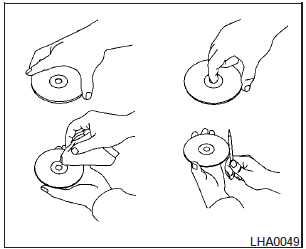
-Handle a CD by its edges. Do not bend the disc. Never touch the surface of the disc.
- Always place the discs in the storage case when they are not being used.
- To clean a disc, wipe the surface from the center to the outer edge using a clean, soft cloth. Do not wipe the disc using a circular motion.
- Do not use a conventional record cleaner or alcohol intended for industrial use.
- A new disc may be rough on the inner and outer edges. Remove the rough edges by rubbing the inner and outer edges with the side of a pen or pencil as illustrated.
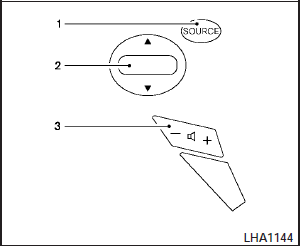
Type A
1. Power on and SOURCE select switch.
2. Tuning switch.
3. Volume control switch.
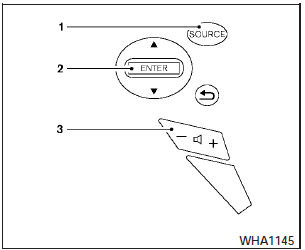
Type B
1. Power on and SOURCE select switch.
2. Menu control switch/ENTER button.
3. Volume control switch.
See also:
Ball mount
The hitch ball is attached to the ball mount and
the ball mount is inserted into the hitch receiver.
Choose a proper class ball mount based on the
trailer weight. Additionally, the ball mount shoul ...
SENSE AND STYLE
Family Friendly (Not Really, Fair, Great, Excellent): Not Really
Fun-Factor (None, Some, Good Times, Groove-On): Groove-On ...
Bird’s-eye view
The bird’s-eye view shows the overhead view of
the vehicle which helps confirm the vehicle
position and the predicted course to a parking
space.
The vehicle icon 1 shows the position of the ...