
Call volume
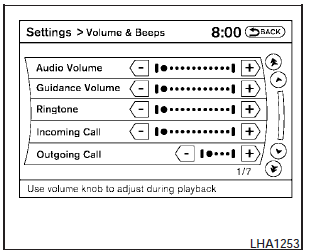
Adjusting the incoming or outgoing call volume may improve clarity if reception between callers is unclear.
- Incoming calladjusting this setting allows you to hear a difference in volume.
- Outgoing calladjusting this setting allows the person you are talking with to hear a difference in volume.
To access the settings, press the SETTING button, then select Volume & Beeps.
You can also adjust the volume of an incoming voice during a call by pushing the volume control switch on the steering wheel or by turning the volume control knob on the instrument panel.
See also:
Security systems
Your vehicle has two types of security systems,
as follows:
- Vehicle security system
- NISSAN Vehicle Immobilizer System
The security condition will be shown by the
security indicator ligh ...
Precautions when starting and driving
- Do not leave children or adults who
would normally require the support
of others alone in your vehicle. Pets
should not be left alone either. They
could accidentally injure themselves ...
Interior
All Pathfinder models seat five people, but foot room for backseat occupants
might be tight beneath the front seats. Large, convenient controls operate the
climate and audio systems. Optional dupl ...