
Instrument panel
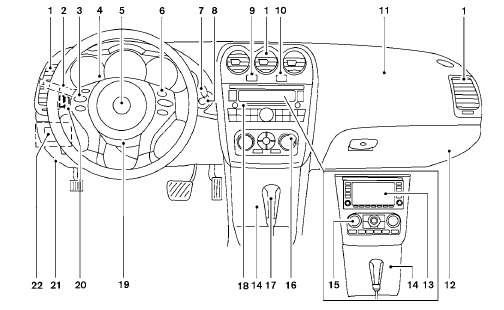
1. Vents (P. 4-18)
2. Headlight/fog light (if so equipped)/turn
signal switch (P. 2-29)
3. Steering wheel switch for audio control
(if so equipped)/Bluetooth Hands-free
Phone System (if so equipped)
(P. 4-96, P. 4-92, P. 4-106)
4. Meters and gauges (P. 2-3)
5. Driver supplemental air bag/horn
(P. 1-41, P. 2-35)
6. Cruise control main/set switch
(P. 5-20)
7. Windshield wiper and washer switch
(P. 2-28)
8. Ignition switch (P. 5-7)
9. Hazard warning flasher switch (P. 2-34)
10. Front passenger air bag status light
(P. 1-52)
11. Front passenger supplemental air bag
(P. 1-41)
12. Glove box (P. 2-41)
13. Navigation system* (if so equipped)
(P. 4-2)
14. Covered storage box (P. 2-42)
15. Heater and air conditioner (automatic)
(P. 4-26)
16. Heater and air conditioner (manual)
(P. 4-19)
17. Shift selector (P. 5-12)
18. Audio system controls (if so equipped)/
Storage (if so equipped)
(P. 4-29, P.2-42)
19. Tilt/telescopic steering wheel controls
(P. 3-28)
20. Vehicle information display controls
(P. 2-17)
21. Hood release (P. 3-23)
22. Trunk opener (P. 3-23)
Vehicle Dynamic Control (VDC) OFF
switch (P. 2-36)
NISSAN Intelligent Key™ port (P. 5-7)
*: Refer to the separate Navigation System Owner’s
Manual (if so equipped).
See the page number indicated in parentheses
for operating details
See also:
Windshield wiper blades. Replacing
Replace the wiper blades if they are worn.
1. Lift the wiper arm away from the windshield.
2. Push the release tab, then move the wiper
blade down the wiper arm to remove.
3. Remove the wiper bla ...
FM/AM radio operation
FM/AM band select:
Pressing the AM·FM button will change the band
as follows:
AM > FM1 > FM2 > AM
When the AM·FM button is pressed while the
ignition switch is in the ACC or ON position, the ...
Manual transmission (if so equipped)
WARNING
● Do not downshift abruptly on slippery
roads. This may cause a loss of control.
● Do not over-rev the engine when shifting
to a lower gear. This may cause a
loss of control o ...