
Autolight system (if so equipped)
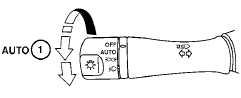
The autolight system allows the headlights to be set so they turn on and off automatically. The autolight system can:
● Turn on the headlights, front parking, tail, license plate and instrument panel lights automatically when it is dark.
● Turn off all the lights when it is light.
● Keep all the lights on for 45 seconds after you place the ignition switch in the OFF position and all doors are closed.
To turn on the autolight system:
1. Turn the headlight switch to the AUTO position 1 .
2. Push the push-button ignition switch to the ON position.
3. The autolight system automatically turns the headlights on and off.
Initially, if the ignition switch is placed in the OFF position and a door is opened and left open, the headlights remain ON for 5 minutes. If another door is opened during the 5 minutes, then the 5 minute timer is reset.
To turn the autolight system off, turn the switch to
the OFF  ,
,
 or position.
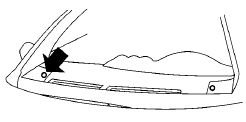
Be sure you do not put anything on top of the autolight sensor located on the top side of the instrument panel. The autolight sensor controls the autolight; if it is covered, the autolight sensor reacts as if it is dark out and the headlights will illuminate. If this occurs while parked with the engine off and the ignition switch placed in the ON position, your vehicle’s battery could become discharged.
See also:
All season tires
NISSAN specifies all season tires on some
models to provide good performance all year,
including snowy and icy road conditions. All
Season tires are identified by ALL SEASON
and/or M&S (Mu ...
Warning lights
All-Wheel Drive (AWD) warning
light (AWD models)
The light illuminates when the ignition switch is
turned to the ON position. It turns off after the
engine is started.
If the All-Wheel Drive ...
Power steering
The power assisted steering uses a hydraulic
pump, driven by the engine, to assist steering.
If the engine stops or the drive belt breaks, you
will still have control of the vehicle. However,
m ...