
Loose Fuel Cap warning
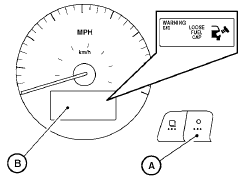
The LOOSE FUEL CAP warning appears in the vehicle information display when the fuel-filler cap is not tightened correctly after the vehicle has been refueled. It may take a few driving trips for the message to be displayed. To turn off the warning, perform the following:
1. Remove and install the fuel-filler cap as soon as possible. See “Fuel-filler cap”.
2. Tighten the fuel-filler cap until it clicks.
3. Press the  next button A on
the instrument
panel located behind the steering
wheel for about 1 second to turn off the
LOOSE FUEL CAP warning B after tightening
the fuel-filler cap.
next button A on
the instrument
panel located behind the steering
wheel for about 1 second to turn off the
LOOSE FUEL CAP warning B after tightening
the fuel-filler cap.
See also:
“Phonebook” (phones without
automatic phonebook download
function)
NOTE:
The “Transfer Entry” command is not available
when the vehicle is moving.
For phones that do not support automatic download
of the phonebook (PBAP Bluetooth profile),
the “Phonebook ...
Activating Alternate Command Mode
1. Press the SETTING button on the instrument
panel.
2. Select the “Others” key on the display.
3. Select the “Voice Recognition” key.
4. Select the “Alternate Command Mode” key.
...
Special winter equipment
It is recommended that the following items be
carried in the vehicle during winter:
- A scraper and stiff-bristled brush to remove
ice and snow from the windows and wiper
blades.
- A sturdy, ...