
During a call
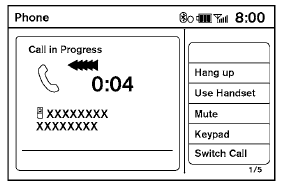
There are some options available during a call. Select one of the following displayed on the screen, if necessary:
Hang up:
Finish the call.
Use Handset:
Transfer the call to the cellular phone.
Mute:
Mute your voice to the person.
Keypad:
Brings up a keypad; enter digits when needed. For example, entering your PIN number for voicemail.
NOTE:
Pushing the TALK  switch on the
steering wheel during a call allows numbers
and digits to be sent using Voice Recognition.
Cancel Mute:
switch on the
steering wheel during a call allows numbers
and digits to be sent using Voice Recognition.
Cancel Mute:
This will appear after the “Mute” key is selected. Mute will be cancelled.
Switch Call:
Select “Switch Call” to answer another incoming call. By selecting “Hang Up,” you can end a call and can speak to a caller who is on hold again.
● This function may not be useable, depending on the model of phone.
To adjust the person’s voice to be louder or quieter, press the volume control switch located on the steering wheel switches or turn the volume control knob on the instrument panel while talking on the phone. This adjustment is also available in the SETTING mode.
See also:
Audio main operation
Audio main operation
AUX button:
Place the ignition switch in the ACC or ON
position and press the AUX button repeatedly
until the iPod mode is displayed on the screen.
If another audio sourc ...
Keys
Keys
1. Two master keys (black) with transponder chip and chrome NISSAN brand
symbol on one side
2. Transponder chip
3. Key number plate
A key number plate is supplied with your keys.
Reco ...
Selecting the correct oil filter
Your new NISSAN vehicle is equipped with a
high-quality genuine NISSAN oil filter. When replacing,
use a genuine NISSAN oil filter or its
equivalent for the reason described in “Change
inter ...