



Nissan Versa: Instruments and controls - Emergency Call (SOS) button
Emergency support
NissanConnect Services provide a comprehensive suite of digital assistance features to support dealing with emergencies, helping to ensure the safety of both the subscribed Nissan Versa vehicle and its driver.
For example, in the event of a sudden medical crisis, physical illness, or serious road injury, you can seek immediate support by pressing the in-vehicle Emergency Call (SOS) button. This establishes a direct voice connection to the dedicated NissanConnect Services Response Center. The Response Center specialists can instantly pinpoint the real-time geographical location of your Nissan Versa via the vehicle's onboard GPS, allowing them to dispatch local police, medical teams, or other emergency agencies as needed.
For detailed information regarding other NissanConnect Services emergency support and roadside safety features, you can contact the NissanConnect Customer Support helpline directly at 1-855-426-6628 or visit the official NissanConnect Services website at www.nissanusa.com/connect (for U.S. owners) or www.nissan.ca/nissanconnect (English) / www.nissan.ca/nissanconnect/fr (French) (for Canadian owners).
WARNING
- Please note that the Automatic Collision Notification service and Emergency Call (SOS) functions cannot be operated under the following circumstances:
- Emergency assistance functions and remote services will not be active or available without a valid, paid subscription to NissanConnect Services.
- The overall NissanConnect Services wireless network system is disabled or undergoing maintenance.
- The vehicle is driven outside the designated service area where the built-in TCU (Telematics Control Unit) is connected to the system.
- The Nissan Versa is physically positioned outside the coverage area of the cellular network partner.
- The vehicle is in a location suffering from poor cellular signal reception, such as long tunnels, deep underground parking structures, behind massive skyscrapers, or in remote mountainous areas.
- The communication line is busy due to high network traffic.
- The onboard TCU (Telematics Control Unit) or other critical electrical components of your vehicle are damaged or not working properly.
- It may not be possible to initiate an emergency call depending on the extreme severity of a vehicle collision and/or the physical state of the electrical system.
- Always pull over and park the vehicle in a safe location, and firmly set the parking brake of your Nissan Versa before attempting to operate or configure the Emergency Call (SOS) button.
- Only use the SOS button in genuine emergency situations. There may be legal and service penalties for inappropriate or fraudulent use of the emergency dispatch service.
- The wireless radio waves emitted by the system could potentially interfere with sensitive electric medical devices. Individuals who wear a cardiac pacemaker should contact their medical device manufacturer to verify any possible interaction risks before operating this system.
- The TCU (Telematics Control Unit) cellular antenna is built directly into the upper central section of the instrument panel.
An occupant with a pacemaker should maintain the minimum physical distance from the antenna specified by their pacemaker manufacturer. The radio frequency emissions from the TCU antenna could adversely affect the normal operation of a pacemaker while the NissanConnect Services are actively transmitting data.
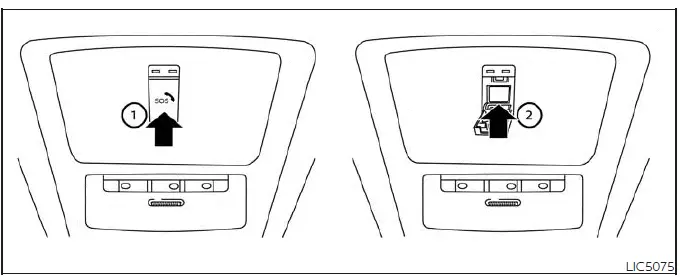
Making an emergency call
The physical Emergency Call (SOS) button is conveniently located on the overhead console near the map light assembly of your Nissan Versa.
1. Gently push the protective cover 1 to release and swing it open, exposing the red Emergency Call (SOS) button 2.
2. Press the Emergency Call (SOS) button firmly to initiate the emergency call process.
3. Once the system connects the line, speak clearly to the live Response Specialist to explain your situation.
If you accidentally press the button and wish to cancel the outgoing emergency call, simply press and hold the Emergency Call (SOS) button down for a few seconds before the line connects.
NOTE:
- After the Emergency Call (SOS) button is pressed, there may be a brief delay before the system initiates the cellular connection. The connection speed depends heavily on local cellular network conditions and whether the TCU (Telematics Control Unit) is currently busy processing other background services for your Nissan Versa.
- An integrated status indicator light located on the Emergency Call (SOS) button housing displays the current operational readiness of the system. If this indicator light is completely unlit, pressing the SOS button will not establish a connection to the Response Specialist. The indicator light will blink continuously while the call is actively connected to the NissanConnect Services Response Center.
- Even when the indicator light is illuminated green, connection to the NissanConnect Services Response Center may fail due to cellular blackouts. If this occurs in an urgent emergency situation, always attempt to contact local authorities using alternative communication devices.
- To prevent the vehicle's battery from draining and to avoid disconnecting the active call line, keep the engine of your Nissan Versa running during an emergency call if it is safe to do so.