



Nissan Versa: Pre-driving checks and adjustments - Fuel-filler door
Opener operation
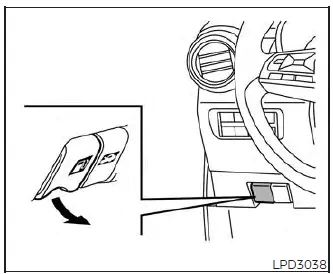
The convenient fuel-filler door release lever is situated beneath the instrument panel on the driver's side of the cabin. To open the fuel-filler door of your Nissan Versa, simply pull this release lever outward. To lock the door after refueling, push the fuel-filler door closed until it securely latches into place flush with the vehicle's body.
Fuel-filler cap
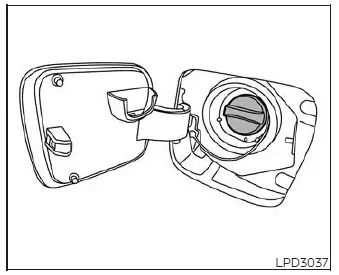
WARNING
- Gasoline is an extremely flammable substance and is highly explosive under specific conditions.
You could suffer severe burns or serious personal injury if fuel is misused, handled improperly, or if safety precautions are ignored.
Always switch off the Nissan Versa engine completely before refueling, and absolutely do not smoke or allow open flames, matches, lighters, or sparks near the vehicle while at the filling station.
- Do not attempt to top off or overfill the fuel tank after the gas station pump nozzle shuts off automatically. Continuing to pump fuel can cause an overflow, resulting in hazardous fuel spray, spillage onto the vehicle body, and a heightened risk of fire.
- Use only a genuine original equipment type fuel-filler cap as a replacement if yours is lost or damaged. The factory cap features a built-in safety relief valve engineered specifically for the proper operation of the fuel and evaporative emission control systems. Installing an incorrect cap can lead to serious system malfunctions, potential safety hazards, or cause the
 Malfunction Indicator Light (MIL) to illuminate on your instrument cluster.
 - Never pour raw fuel directly into the throttle body or intake assembly in an attempt to start your vehicle, as this can cause a dangerous backfire and engine compartment fire.
- Do not fill a portable fuel container while it is resting inside the vehicle passenger cabin or on a trailer bed. Static electricity can build up easily and spark an explosion of flammable liquid, vapor, or gas. To reduce the risk of serious injury or death when filling any portable fuel containers:
- Always place the portable container directly on the ground away from the vehicle before you begin filling.
- Do not use any electronic devices, mobile phones, or vehicle features while refueling.
- Keep the fuel pump nozzle in constant contact with the lip of the container while you are filling it to ground the static charge.
- Use only approved, heavy-duty portable fuel containers designed specifically for carrying flammable liquids.
CAUTION
- Do not use E-15 or E-85 ethanol blend fuels in your gasoline-powered engine, as these high-ethanol mixtures are not compatible with the fuel system components and will void your warranty.
- The Loose Fuel Cap warning message will appear on the instrument display if the fuel-filler cap of your Nissan Versa is not turned and tightened properly. It may take a few driving trips for the diagnostic system to detect this state and display the message. Failure to tighten the fuel-filler cap properly after this specific warning appears may eventually cause the
 Malfunction Indicator Light (MIL) to illuminate.
 - Failure to tighten the fuel-filler cap properly may cause the
 Malfunction Indicator Light (MIL) to illuminate.
If the
 check engine light illuminates specifically because the fuel-filler cap was left loose, missing, or cross-threaded, tighten or reinstall the cap properly and continue to drive normally. The
 light should turn off automatically after a few driving trips. If the
 check engine light remains lit after several normal driving trips, have the vehicle inspected. It is highly recommended that you visit an authorized NISSAN dealer to diagnose the issue.
 - If fuel is accidentally spilled on the vehicle body or paintwork, flush it away immediately with clean water to prevent chemical damage to the clear coat and paint finish.
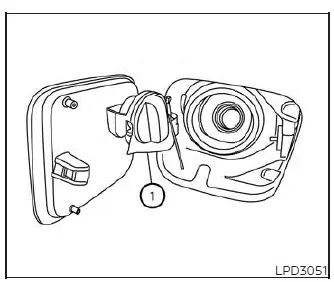
To remove the fuel-filler cap:
1. Turn the fuel-filler cap counterclockwise several times to unscrew it and remove it from the filler neck.
2. Place the removed fuel-filler cap securely onto the integrated cap holder (labeled 1) located on the inside of the open fuel-filler door while refueling.
To install the fuel-filler cap:
1. Insert the fuel-filler cap straight and level into the fuel-filler neck to prevent cross-threading.
2. Turn the fuel-filler cap clockwise until you hear a single, distinct click. This audible click indicates that the cap is fully sealed and tensioned correctly.
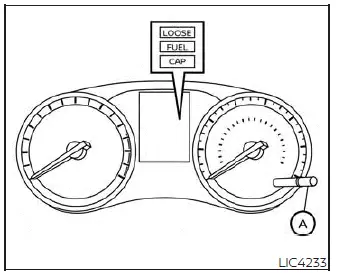
LOOSE FUEL CAP warning message
The LOOSE FUEL CAP warning message is triggered and displayed in the trip computer display when the fuel-filler cap is not tightened correctly after the vehicle has been refueled. Because of the onboard emissions diagnostic cycle, it may take a few driving trips for the sensor message to be displayed. To clear this warning message after securing the cap, perform the following steps:
1. Remove and reinstall the fuel-filler cap as previously described as soon as it is safe to do so.
2. Tighten the fuel-filler cap clockwise until you hear it click, confirming it is fully sealed.
3. Press and hold the trip computer reset button (labeled A) for more than 1 second to manually clear and reset the LOOSE FUEL CAP warning message on the instrument panel.