



Nissan Versa: Instruments and controls - Headlight and turn signal switch
Headlight control switch Nissan Versa sedan
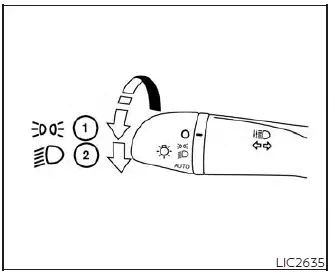
Type A (if so equipped)
Lighting
- Rotate the outer dial of the switch stalk to the
 position, and the front parking, tail, license plate, and instrument panel lights will illuminate. Simultaneously, the green side light and headlight indicator light
 will illuminate in the meter cluster of your Nissan Versa.
 - Rotate the dial further to the
 position, and the low beam headlights will turn on while all the other parking and marker lights remain illuminated.
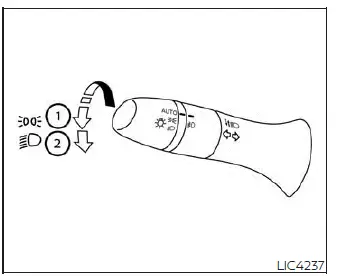
Type B (if so equipped)
CAUTION
Always operate the high-draw exterior headlights while the engine of your Nissan Versa is running. Keeping the headlights turned on for extended periods with the engine off can quickly drain the 12V battery and leave you unable to start your vehicle.
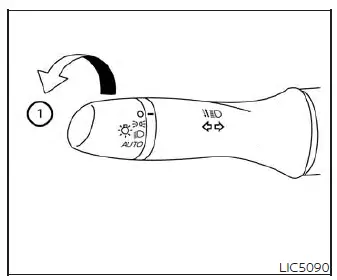
Autolight system
The advanced autolight system allows the exterior lighting to turn on and off automatically based on ambient brightness. When active, the autolight system can:
- Turn on the low beam headlights, front parking, tail, license plate, and instrument panel lights automatically when driving in low-light conditions, at dusk, or inside dark parking garages.
- Turn off all exterior and cluster lighting automatically when bright daylight is detected.
- Keep all exterior lights illuminated for a set period after you place the ignition switch of your Nissan Versa in the OFF position and close all passenger doors (home lighting function).
NOTE:
The light sensitivity of the autolight system and the delay timer for the automatic headlight shutoff can be customized through the settings menu on the vehicle information display.
To turn on the autolight system:
1. For USA: Turn the headlight switch dial on the steering column stalk to the AUTO position 1.
For CAN: Turn the headlight switch to the AUTO 1 or
 position.
2. Place the ignition switch in the active ON position.
3. The autolight system will now automatically manage the headlights according to surrounding ambient lighting conditions.
By default, if you turn the ignition switch to the OFF position and open any door, the headlights will remain on for a pre-programmed period of time to light your path. Opening another door during this countdown will automatically reset the timer to ensure your safety.
To turn the autolight system off manually:
For USA: Rotate the switch to the OFF,
 , or
, or
 position.
For CAN: Turn the headlight control switch to the
 position.
The Intelligent Auto Headlight system is highly responsive, turning on the headlights automatically when it detects darkness and shutting them off when the surrounding environment is bright.
If the ignition switch is placed in the ON position while the manual parking brake is firmly applied, the headlights will remain off until the parking brake is released.
To enhance road visibility, the headlights will turn on automatically at twilight (if so equipped) or during rainy weather conditions (specifically when the windshield wipers are operated continuously for several sweeps).
If you turn off the engine and leave one of the doors open, the headlights of your Nissan Versa will remain lit for 5 minutes before automatically turning off to prevent complete battery drainage.
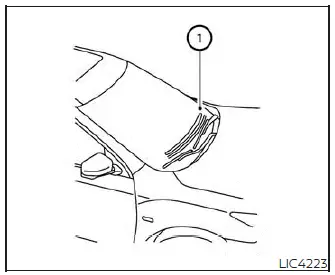
Be extremely careful not to place papers, dashboard covers, or other items on top of the autolight sensor located on the top side 1 of the instrument panel. The autolight sensor monitors the surrounding light levels; if it is covered, it acts as though it is dark outside, and the headlights will remain illuminated. If this occurs while the car is parked with the engine off and the ignition left in the ON position, it can result in a discharged battery in your Nissan Versa.
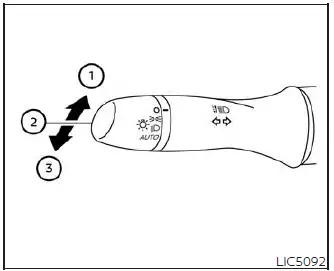
Headlight beam select
- To select the high beam function, push the headlight control lever forward away from you. The high beam headlights will switch on, and the blue high beam indicator light
 will illuminate on the instrument panel.
 - Pull the control lever back toward you to return the headlights to the low beam position.
- To flash the headlights to signal another driver, pull the lever briefly toward you and release it; this will flash the high beams on and off instantly.
High Beam Assist
The High Beam Assist system automatically manages your high beams when driving your Nissan Versa at speeds of approximately 18 mph (30 km/h) and above.
If the forward-facing camera detects an oncoming vehicle or a leading vehicle ahead while your high beams are active, the system will automatically switch the headlights to low beams to prevent blinding other drivers.
WARNING
- While the High Beam Assist system is a convenient assistant, it is not a substitute for safe driving. The driver must remain alert and attentive at all times, prioritize safe driving practices, and manually switch between high and low beams whenever necessary.
- The high beams or low beams may fail to switch automatically under several conditions. In the following situations, you must switch the high and low beams manually:
- During bad weather conditions (such as heavy rain, fog, snow, or high winds).
- When there is a nearby light source similar to a headlight or tail light.
- When the headlights of an oncoming vehicle or the tail lights of a leading vehicle are turned off, when their light is obscured by road grime, snow, or mud, or when their light beam is misaligned.
- When driving in environments with sudden, rapid changes in brightness.
- When driving on rolling hills, steep inclines, or uneven road surfaces.
- When driving along roads with frequent, sharp curves.
- When highly reflective road signs, lane markers, or mirror-like surfaces bounce bright light back toward the front of your Nissan Versa.
- When a large trailer or shipping container being towed by a vehicle in front of you reflects intense light back toward your camera sensor.
- When one of the headlights on your vehicle is physically damaged, out of alignment, or covered in dirt.
- When the body of your Nissan Versa is leaning at an uneven angle due to a flat tire, overloading, or being towed.
- The timing for switching between high and low beams automatically may also vary depending on the following situations:
- The output intensity and brightness of the headlights of the oncoming vehicle or the tail lights of the leading vehicle.
- The relative movement, angle, and speed of the oncoming vehicle and the leading vehicle.
- When only a single headlight on the oncoming vehicle or a single tail light on the leading vehicle is working.
- When the oncoming or leading vehicle is a motorcycle or other two-wheeled vehicle.
- Changing road geometry (such as steep slopes, off-camber curves, or rough asphalt).
- The physical payload of your Nissan Versa, including the number of passengers and the distribution of cargo.
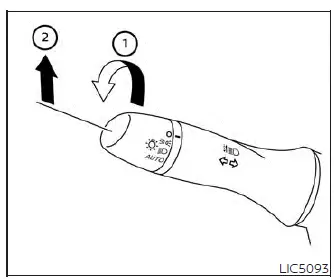
High Beam Assist operation
To successfully activate the High Beam Assist system in your Nissan Versa, rotate the headlight switch to the AUTO position 1 and push the control lever forward 2 into the high beam position. The green
 High Beam Assist indicator light will illuminate on the instrument panel meter cluster, confirming that the automated system is active and monitoring road conditions.
If the High Beam Assist indicator light fails to illuminate under these conditions, the automatic high-beam feature may be inactive or there may be an internal system malfunction. To ensure your vehicle's safety features operate as designed, have your system checked. It is highly recommended that you visit an authorized NISSAN dealer to diagnose your Nissan Versa.
When you slow down and your vehicle speed drops below approximately 12 mph (20 km/h), the system will automatically deactivate the high beams and switch the headlights to low beam operation to prevent glare in slow-moving traffic or residential areas.
To turn off the High Beam Assist system manually, rotate the headlight switch to the standard
 position, or simply return the control lever back to its neutral center position to restore normal low beam headlight operation.
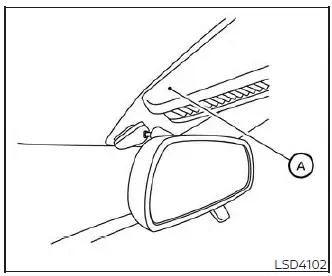
Ambient image sensor maintenance
The highly sensitive ambient image sensor A for the High Beam Assist system is situated in front of the inside rearview mirror, mounted flat against the windshield. To maintain the proper operation of the system and prevent any system faults or blind spots on your Nissan Versa, be sure to observe the following maintenance rules:
- Always keep the windshield surface directly in front of the camera clean, clear of road grime, and free of heavy ice or condensation.
- Do not paste any stickers, Toll passes, or transparent films on the windshield, and avoid mounting aftermarket accessories near the ambient image sensor's field of view.
- Do not strike, scratch, or apply structural pressure to the windshield glass around the ambient image sensor, and never touch or wipe the inner optical lens of the sensor itself.
If the ambient image sensor or the windshield area housing it is cracked or damaged due to a stone chip or an accident, it is recommended that you visit an authorized NISSAN dealer for a professional replacement and system recalibration.
Battery saver system
If you switch the engine off and place the ignition in the OFF position while the headlight control switch of your Nissan Versa is left in either the
 or
or
 position, the battery saver system will automatically shut off the headlights after a short period of time to preserve your battery charge.
NOTE:
The automatic Battery Saver system settings can be customized, and the feature may be disabled in some configurations using the vehicle information display.
CAUTION
Even though the built-in battery saver feature automatically turns off the headlights after a predetermined period, you should always return the headlight switch to the AUTO or OFF position when parking your Nissan Versa with the engine off to prevent unexpected power drain on your 12V vehicle battery.
```
High Beam Assist operation
To successfully activate the High Beam Assist system in your Nissan Versa, rotate the headlight switch to the AUTO position 1 and push the control lever forward 2 into the high beam position. The green
High Beam Assist indicator light will illuminate on the instrument panel meter cluster, confirming that the automated system is active and monitoring road conditions.
If the High Beam Assist indicator light fails to illuminate under these conditions, the automatic high-beam feature may be inactive or there may be an internal system malfunction. To ensure your vehicle's safety features operate as designed, have your system checked. It is highly recommended that you visit an authorized NISSAN dealer to diagnose your Nissan Versa.
When you slow down and your vehicle speed drops below approximately 12 mph (20 km/h), the system will automatically deactivate the high beams and switch the headlights to low beam operation to prevent glare in slow-moving traffic or residential areas.
To turn off the High Beam Assist system manually, rotate the headlight switch to the standard
position, or simply return the control lever back to its neutral center position to restore normal low beam headlight operation.
Ambient image sensor maintenance
The highly sensitive ambient image sensor A for the High Beam Assist system is situated in front of the inside rearview mirror, mounted flat against the windshield. To maintain the proper operation of the system and prevent any system faults or blind spots on your Nissan Versa, be sure to observe the following maintenance rules:
- Always keep the windshield surface directly in front of the camera clean, clear of road grime, and free of heavy ice or condensation.
- Do not paste any stickers, Toll passes, or transparent films on the windshield, and avoid mounting aftermarket accessories near the ambient image sensor's field of view.
- Do not strike, scratch, or apply structural pressure to the windshield glass around the ambient image sensor, and never touch or wipe the inner optical lens of the sensor itself.
If the ambient image sensor or the windshield area housing it is cracked or damaged due to a stone chip or an accident, it is recommended that you visit an authorized NISSAN dealer for a professional replacement and system recalibration.
Battery saver system
If you switch the engine off and place the ignition in the OFF position while the headlight control switch of your Nissan Versa is left in either the
or
position, the battery saver system will automatically shut off the headlights after a short period of time to preserve your battery charge.
NOTE:
The automatic Battery Saver system settings can be customized, and the feature may be disabled in some configurations using the vehicle information display.
CAUTION
Even though the built-in battery saver feature automatically turns off the headlights after a predetermined period, you should always return the headlight switch to the AUTO or OFF position when parking your Nissan Versa with the engine off to prevent unexpected power drain on your 12V vehicle battery.
```