Nissan Versa: Pre-driving checks and adjustments - NISSAN Intelligent Key system
WARNING
- The radio waves emitted by the system can potentially interfere with the proper operation of implanted cardiac pacemakers and other critical electrical medical equipment. Individuals utilizing a pacemaker or similar life-support devices are strongly advised to contact the manufacturer of their medical equipment to understand any potential biological influences and technical compatibility concerns before operating this system.
- Your vehicle's Intelligent Key transmits active radio frequency signals whenever its buttons are pressed.
According to Federal Aviation Administration (FAA) guidelines, these high-frequency radio waves have the potential to disrupt sensitive aircraft navigation systems, onboard radar, and communication equipment. Consequently, do not press the buttons or operate your Intelligent Key while on board an airplane.
Additionally, ensure that the key fob is securely packed in your luggage or carry-on bag in a way that prevents the buttons from being pressed or activated unintentionally during your flight.
- To guarantee complete vehicle stability, always verify that the gear selector is shifted into the P (Park) position and that the parking brake is fully applied whenever you park, load cargo, or enter and exit your vehicle.
Failure to engage the P (Park) position and secure the parking brake can allow the vehicle to roll or drift unexpectedly, posing a severe threat of property damage, critical personal injury, or a fatal accident.
The innovative NISSAN Intelligent Key system allows you to effortlessly lock or unlock all vehicle doors using either the integrated remote control buttons or by pressing the exterior request switch (if so equipped) on the door handles, completely eliminating the need to search through your pocket or purse. However, please be aware that the local operating environment and surrounding physical conditions can directly affect the signal range and responsiveness of this system in your Nissan Versa.
Please read through the instructions and precautions below to ensure safe, continuous, and optimal operation of your system.
CAUTION
- Always keep the Intelligent Key physically on your person whenever you are approaching, operating, or driving your vehicle.
- Never leave the Intelligent Key unattended inside the cabin when exiting your vehicle, as this can present security risks or lead to accidental lockouts.
Because your Intelligent Key remains in constant, low-power standby communication with the vehicle to monitor proximity, it actively receives and transmits radio waves. Under certain operating conditions, local environmental factors may introduce electromagnetic interference and temporarily disrupt the Intelligent Key system. This is especially true under the following conditions:
When operating your Nissan Versa in close proximity to massive broadcasting structures, such as television transmission towers, electrical power substations, or commercial radio towers.
- When you are carrying the key fob alongside active wireless communication equipment, such as a cellular telephone, a two-way transceiver, or a citizen's band (CB) radio.
- When the key fob is stored in contact with, or directly shielded by, metallic materials, foil packaging, or metal-lined wallets.
- When other forms of radio-controlled remote equipment or nearby wireless transmitters are operating on similar frequencies.
- When the Intelligent Key is resting near electronic household appliances, including personal computers, tablet devices, or high-definition monitors.
- When the vehicle is parked right next to automated municipal parking meters that emit active wireless detection signals.
If you encounter interference in these locations, simply move the Intelligent Key closer to the door handle to override the signal blockage, adjust its physical proximity away from interfering devices, or use the integrated mechanical backup key to gain manual entry.
The expected operational lifespan of the internal battery is approximately two years, though this can vary depending on frequency of use and storage conditions. If you notice a reduction in operating range, the battery should be promptly replaced with a fresh one of equivalent specifications.
If the battery inside the key fob drops to a critically low charge, the NISSAN Intelligent Key warning light (if so equipped) on the instrument panel of your Nissan Versa will flash green for approximately 30 seconds after you turn the ignition switch to the ON position.
Since the transmitter maintains a continuous wireless link, storing the fob near household electronics that emit strong electromagnetic fields—such as television sets, wireless routers, or personal computers—will accelerate battery drain and significantly shorten its overall life.
If your key fob battery becomes fully depleted while you are away from home, you can still start the engine: firmly press down on the foot brake pedal, touch the physical ignition switch directly with the Intelligent Key body, and then push the ignition switch to start the engine within 10 seconds after hearing the system chime.
For your convenience, a single Nissan Versa vehicle can support the registration and simultaneous programming of up to four individual Intelligent Keys. If you need to purchase extra keys or require assistance with programming new fobs, it is highly recommended to visit an authorized NISSAN dealer for certified setup.
CAUTION
To prevent permanent electrical failure and keep your key fob functioning optimally, please avoid the following situations:
- Never submerge or expose the key fob, which houses highly sensitive microchips and circuits, to fresh water, salt water, or chemical cleaners. Doing so can cause immediate short circuits and permanently disable the system.
- Avoid dropping the key fob onto hard surfaces, pavement, or concrete.
- Do not strike the key fob housing sharply against hard metallic surfaces or other objects.
- Never attempt to modify, alter, or self-repair the internal circuit board or external housing of the Intelligent Key.
- Water intrusion can completely ruin the internal components. If your key fob gets wet, immediately wipe it down with a soft, absorbent towel until it is thoroughly dry.
- If the ambient outdoor temperature drops below 14ºF (-10ºC), the output efficiency of the internal battery may decline temporarily, reducing key fob responsiveness.
- Never expose the key fob to extreme heat environments exceeding 140ºF (60ºC), such as on top of the dashboard on a hot summer day.
- Do not attach the key fob to key rings, clips, or lanyards that feature built-in magnetic elements.
- Keep the key fob stored away from devices that generate powerful magnetic fields, such as audio subwoofers, CRT monitors, and large personal computer speakers.
In the event that an Intelligent Key for your Nissan Versa is lost or stolen, NISSAN recommends immediately erasing the specific key's registration code from your car's memory. This security procedure effectively blocks unauthorized individuals from using the lost key to access or drive away with your vehicle. For detailed guidance on key code erasure and reprogramming, please contact your local NISSAN dealer.
Operating range Nissan Versa third generation
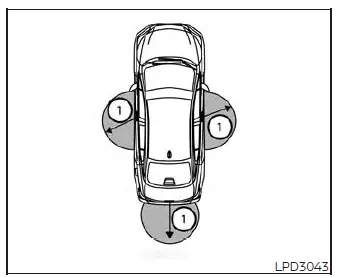
The electronic keyless entry and locking features of the Intelligent Key system can only be activated when the key fob is physically positioned within the designated operating range from the door handle request switch (if so equipped) 1. This localized detection field ensures that your Nissan Versa can safely verify the key's presence before executing any entry commands.
If the internal battery of your Intelligent Key is heavily discharged or if you are parked near sources of strong electromagnetic interference, the effective operating range of the key fob may become significantly narrower. Under these challenging environmental conditions, the sensor system may experience signal delays or fail to recognize the key altogether.
Under normal conditions, the standard operating range is approximately within 31.5 inches (80 cm) from each exterior request switch (if so equipped) 1 on the door handles of your Nissan Versa.
If the key fob is held too close to the side door glass, pressed directly against the exterior door handle, or placed right against the rear bumper assembly, the request switches (if so equipped) may fail to operate because the internal antennas cannot accurately determine the key's position.
When the Intelligent Key is located within this active proximity zone, any individual can lock or unlock the doors simply by pressing the request switch (if so equipped)—even if they are not the ones physically holding the key. For this reason, always remain alert to your surroundings when standing near your Nissan Versa with the key in your possession.
Door locks/unlocks precaution
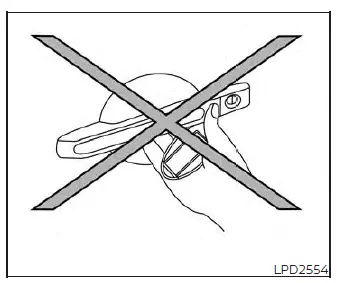
- Avoid holding the Intelligent Key directly in your palm while using that same hand to press the door handle request switch (if so equipped) as illustrated. Holding the key fob too close to the handle mechanism makes it difficult for the Nissan Versa transceiver system to distinguish whether the key is on the outside or the inside of the cabin, which may temporarily disable the unlocking function.
- After pressing the door handle request switch (if so equipped) to lock your vehicle, always manually pull on the door handle to verify that all doors are securely locked and the latch mechanism is fully engaged.
- To completely eliminate the risk of accidentally locking your keys inside the cabin, make it a strict habit to double-check that you have the Intelligent Key physically on your person before locking any doors of your Nissan Versa.
- Do not pull on the exterior door handle at the exact same time you press the door handle request switch (if so equipped). Doing so will successfully unlock the locking mechanism but will prevent the door from actually swinging open; you must release the door handle completely and then pull it a second time to open the door.
NISSAN Intelligent Key Operation Nissan Versa N18
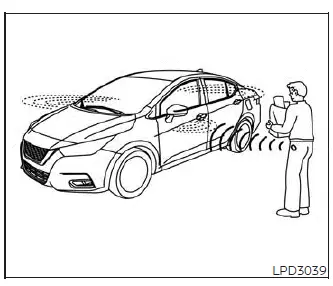
For everyday convenience, you can easily lock or unlock the doors of your Nissan Versa without ever needing to retrieve the Intelligent Key from your pocket, purse, or briefcase.
As long as you are carrying the active Intelligent Key on your person, you can lock or unlock all doors simultaneously by simply pressing the integrated door handle request switch (if so equipped) when standing within the system's operational range.
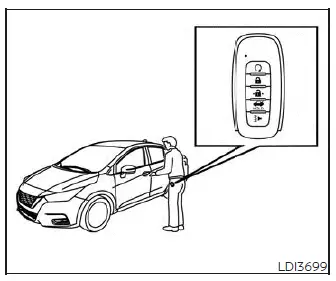
Locking doors
1. Safely bring your vehicle to a stop, move the shift lever to the P (Park) position, place the ignition switch in the LOCK position, and double-check to ensure you have the Intelligent Key in your possession.
2. Exit the vehicle and close all the passenger doors and the driver's door completely.
3. Push any of the active door handle request switches (if so equipped) 1 while holding or carrying the Intelligent Key with you within the operating zone.
4. The central locking system will engage, and all doors on your Nissan Versa will lock simultaneously.
5. To visually and audibly confirm that the vehicle is secure, the hazard indicator lights will flash twice and the exterior warning buzzer will sound twice.
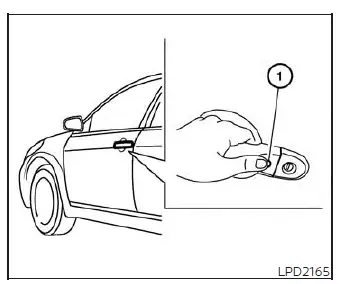
NOTE:
- The doors will not lock with the door handle request switch (if so equipped) unless the ignition switch is turned to the LOCK position.
- The doors will not lock by pressing the passenger door handle request switch (if so equipped) if any door on your Nissan Versa is currently open.
However, you can still lock all doors using the mechanical key from the driver's side door cylinder, even if any of the doors remain open during the process.
- If you prefer to disable this entry system, the exterior request switches (if so equipped) on all doors can be deactivated by switching the "Ext. Door Switch" feature to the OFF position through the "Vehicle Settings" menu within the Nissan Versa vehicle information display.
- To prevent key loss, the doors will not lock using the door handle request switch (if so equipped) if the Intelligent Key is detected inside the cabin, and a warning beep will sound. However, if one Intelligent Key is left inside the vehicle, you can still lock the doors from the outside using a second registered Intelligent Key.
WARNING
After locking the doors using the exterior request switch (if so equipped), always double-check and physically verify that every door is securely locked by manually pulling on the door handles.
Failure to verify that the latches are fully secure may lead to doors being left unlocked inadvertently, which can significantly compromise the safety and security of your Nissan Versa and its contents.
CAUTION
- When utilizing the exterior request switch (if so equipped) to lock your vehicle, always make certain that you have the Intelligent Key physically on your person beforehand to prevent accidentally shutting the key inside the cabin.
- The physical request switch (if so equipped) on the door handle will only function and respond when the Intelligent Key is successfully detected by the Nissan Versa security transceivers.
Lockout protection
To eliminate the stressful situation of being locked out, your Nissan Versa is equipped with an integrated lockout protection system as a core feature of the Intelligent Key technology.
If the driver's side door is left open while you lock the doors, and you then place or accidentally drop the Intelligent Key inside the vehicle before closing all the doors, the locking mechanism will automatically disengage to the unlocked position and an alert buzzer will sound immediately to notify you.
NOTE:
The doors may fail to lock if the Intelligent Key is held in the exact same hand that you are using to press the door handle request switch (if so equipped). To ensure consistent signal transmission and detection, place your Intelligent Key in a pocket, a purse, or hold it in your opposite hand when locking your Nissan Versa.
CAUTION
The advanced lockout protection system in your Nissan Versa is designed to prevent you from locking your keys inside the cabin. However, it may not function properly if the Intelligent Key is placed in specific locations where the onboard antennas cannot accurately detect its signal. Avoid leaving the key in the following areas:
- When the Intelligent Key is placed on top of the instrument panel, dashboard, or near the windshield where signal reflection can occur.
- When the Intelligent Key is placed on top of the rear parcel shelf under the back glass window.
- When the Intelligent Key is placed inside the deep compartments of the glove box or any of the center console storage bins.
- When the Intelligent Key is placed inside the door pockets or storage compartments located on the lower door panels.
- When the Intelligent Key is placed on or directly under the spare tire area in the trunk compartment.
- When the Intelligent Key is placed inside or immediately near metallic materials, such as foil wraps, metallic cases, or certain electronic devices.
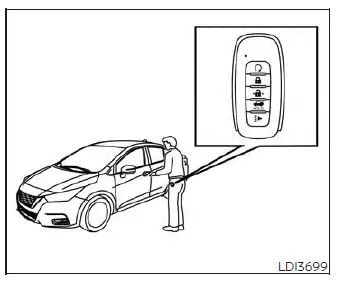
Unlocking doors
1. Ensure you are carrying the Nissan Versa Intelligent Key with you as you approach the vehicle.
2. Push the exterior door handle request switch (if so equipped) 1 on the driver's or front passenger's door.
3. The hazard indicator lights will flash once and the outside warning buzzer will sound once to confirm that the driver's door has unlocked.
4. Push the same door handle request switch (if so equipped) 1 again within 1 minute of the first press to unlock all remaining passenger doors.
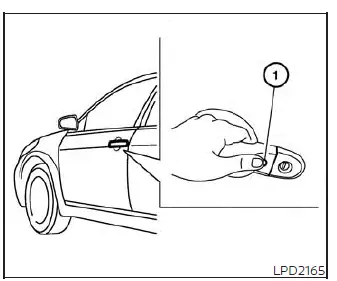
NOTE:
The request switches (if so equipped) on the doors can be completely deactivated if you prefer. This is done by switching the Ext.
Door Switch feature to the OFF position using the "Vehicle Settings" menu on the vehicle information display screen located in the instrument cluster of your Nissan Versa.
If you pull the physical door handle at the exact moment the doors are unlocking, that specific door may fail to open and remain in a locked state.
Returning the door handle fully to its original resting position will allow the locking mechanism to reset and unlock the door. If the door still does not open after you return the handle, simply push the door handle request switch (if so equipped) once more to complete the unlock cycle.
To keep your Nissan Versa secure, all doors will automatically relock unless one of the following manual operations is performed within 1 minute after you push the request switch (if so equipped) to unlock the vehicle:
- Opening any of the passenger doors or the driver's door.
- Pushing the ignition switch inside the cabin to start the vehicle or select an accessory power mode.
Using the interior light
For your convenience and visibility at night, the interior cabin light will illuminate for a pre-programmed period of time whenever you unlock the doors, provided that the main interior light switch is not in the manual OFF position.
You can turn off this entry lighting immediately without waiting for the timer to expire by performing any of the following actions:
- Placing the ignition switch inside the cabin in the ON position.
- Locking the vehicle doors using the lock button on your remote control key fob.
- Manually sliding the physical interior light switch to the OFF position.
- Switching the Auto Room Lamp feature to the OFF position through the "Vehicle Settings" menu on the vehicle information display in your Nissan Versa.
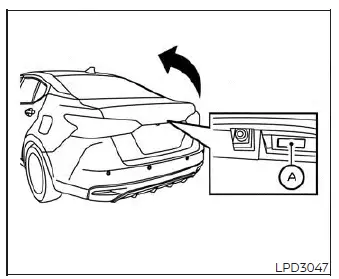
Opening the trunk lid
1. First, make sure all the vehicle doors are unlocked.
2. Walk to the rear of your Nissan Versa and push the trunk opener switch (if so equipped) OA while carrying the Intelligent Key with you in close proximity to the trunk area.
3. The latch mechanism will release, and the trunk will unlatch. To confirm this action, a warning chime will sound four times.
4. Lift the trunk lid fully to access your cargo space.
Lockout protection
To prevent the frustrating situation of sealing your keys inside your Nissan Versa trunk, the cargo compartment is protected by an integrated electronic lockout protection system linked directly to the keyless entry sensors.
If all vehicle doors are locked and you close the trunk lid with the Intelligent Key left inside the cargo area, an exterior warning chime will sound and the doors will automatically unlock to ensure you can retrieve your key.
How to use the remote keyless entry function Nissan Versa sedan
The highly intuitive remote keyless entry function allows you to lock or unlock all doors of your Nissan Versa using the remote keyless control buttons built directly into your Intelligent Key. Under optimal conditions, the wireless transmitter has an operational range of up to approximately 33 feet (10 meters) away from the vehicle.
Please note that the actual effective operating distance can vary depending on local environmental factors, physical obstacles, and electromagnetic interference around the vehicle.
The remote keyless entry functions may fail to respond or operate under the following conditions:
- When the Intelligent Key is positioned outside the specified maximum operational range.
- When any of the passenger doors, the driver's door, or the trunk lid are currently open or not fully closed and latched.
- When the internal battery of your Intelligent Key is depleted or too weak to transmit a strong signal.
CAUTION
Whenever you lock the doors of your Nissan Versa using the wireless remote control on your Intelligent Key, always confirm that you have the key physically on your person and have not left it inside the cabin.
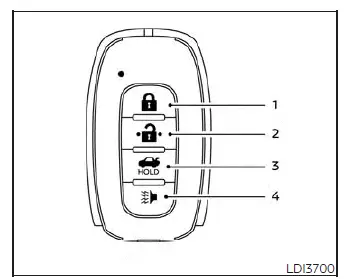
Type A (if so equipped)
-
 (lock) button
 -
 (unlock) button
 -
 (trunk) button
 -
 (panic) button
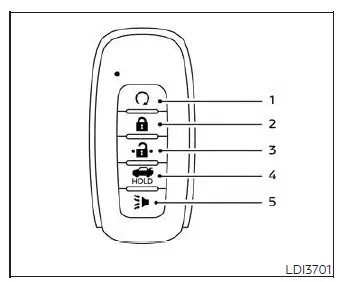
Type B (if so equipped)
-
 (remote engine start) button
 -
 (lock) button
 -
 (unlock) button
 -
 (trunk) button
 -
 (panic) button
Locking doors
1. Safely bring the vehicle to a stop and place the ignition switch in the LOCK position.
2. Exit the vehicle and make sure you close all doors, including the trunk.
3. Press the
 button on your Intelligent Key.
4. The hazard indicator lights will flash twice and the vehicle's horn will beep once to let you know the system is armed.
5. All doors of your Nissan Versa will lock securely.
WARNING
Immediately after locking the doors using your Intelligent Key, always verify that they are securely locked by manually checking the exterior door handles. Failure to do so could result in you unknowingly leaving your doors unlocked, which can significantly decrease the physical safety and anti-theft security of your vehicle.
Unlocking doors
1. Press the
 button on your Intelligent Key once to unlock the driver's side door.
2. The exterior hazard indicator lights will flash once to confirm that the driver's door has unlocked.
3. Press the
 button a second time within 60 seconds to unlock all remaining passenger doors.
NOTE:
The default Selective Unlock configuration can be customized according to your preferences using the "Vehicle Settings" menu on the vehicle information display screen of your Nissan Versa.
To help maintain security, all doors will automatically lock again unless one of the following manual actions is completed within 1 minute after pressing the
 button:
- Opening any of the doors.
- Pushing the interior engine ignition switch.
Using the interior light
For convenience and safety when entering your vehicle at night, the interior cabin light will turn on and illuminate for a set period of time when any door is unlocked, provided that the main interior light switch has not been moved to the manual OFF position.
You can turn this illumination off immediately without waiting for the automated timer to run out by performing any of the following operations:
- Placing the ignition switch inside the cabin to the ON position.
- Locking the doors from the outside using the remote control button.
- Switching the physical interior light switch directly to the manual OFF position.
- Deactivating the Auto Room Lamp feature under the "Vehicle Settings" menu on your Nissan Versa vehicle information display.
Releasing the trunk lid
To access your cargo area, press and hold the
 button on your key fob for longer than 0.5 seconds to unlatch the trunk lid. Please note that for security, the trunk release button is disabled when the ignition switch is placed in the ON position.
Using the panic alarm
If you are near your vehicle and feel threatened, you can activate the panic alarm to call attention to your position by pressing and holding the
 button on your Intelligent Key for longer than 0.5 seconds.
The loud panic alarm will sound and the headlights will turn on, staying active for a set period of time.
The active panic alarm can be stopped manually by performing any of the following actions:
- Allowing the alarm cycle to run until it times out and turns off automatically.
- Pressing any of the functional buttons on your Intelligent Key.
- Pushing the exterior request switch (if so equipped) on either the driver's or passenger's door, provided you are carrying the Intelligent Key within range of the door handle.
Answer back horn feature
If you prefer silent locking, the answer back horn feature on your Nissan Versa can be deactivated using the Intelligent Key controls. When the feature is deactivated and the
 button is pressed, the hazard indicator lights will still flash twice, but the horn will remain silent. When the
 button is pressed, neither the hazard indicators nor the horn will operate to signal confirmation.
NOTE:
If you customize the Answer Back Horn and light flash settings using the Intelligent Key shortcut, the vehicle information display screen will show your currently active mode after you cycle the ignition switch from OFF to ON. You can also make these adjustments directly using the vehicle settings menu on the display screen.
To deactivate:
Press and hold both the
 and
and
 buttons on your remote transmitter simultaneously for at least 6 seconds. The hazard indicator lights will flash three times to confirm that the answer back horn feature has been successfully deactivated.
To activate:
Press and hold both the
 and
and
 buttons simultaneously for at least 6 seconds once more. The hazard indicator lights will flash once and the vehicle horn will chirp once to confirm that the answer back horn feature has been reactivated.
Please note that deactivating this confirmation feature does not affect or silence the vehicle's alarm system if it is triggered by an intrusion.
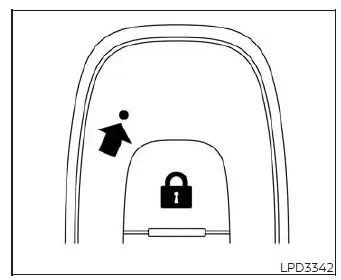
Intelligent Key button operation light
A small indicator light on the key fob housing blinks briefly whenever you press a button on your Intelligent Key. This light merely confirms that the remote has successfully transmitted a wireless signal; always look at your vehicle or listen for the beep to verify that the target operation was completed.
If the indicator light does not blink when a button is pressed, the internal battery is likely depleted.
If this occurs, please replace the battery as soon as possible to maintain reliable remote keyless access.
Warning signals
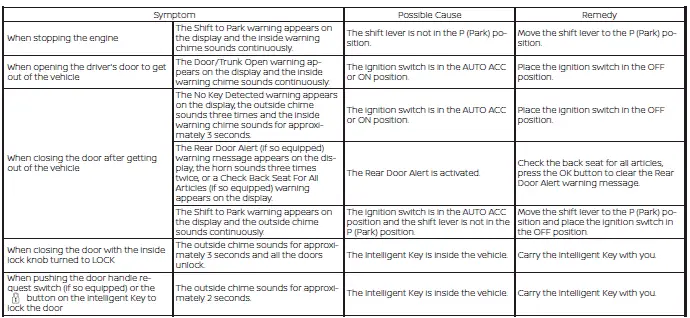
To help prevent the vehicle from rolling away unexpectedly due to accidental operation of the ignition system, or to deter vehicle theft, a series of warning chimes and buzzers will sound from both inside and outside the vehicle, accompanied by specific text alerts displayed on your instrument panel.
Whenever a warning chime sounds or a message is shown on the dashboard, immediately check both the status of your vehicle and the location of your Intelligent Key.
Troubleshooting guide (Continuously Variable Transmission only)
Please verify the location of all programmed Intelligent Keys associated with your Nissan Versa. If another active key is located within the detection range or left inside the cabin, the vehicle's electronic systems may respond differently than you expect during troubleshooting or operation.