



Nissan Versa: Instruments and controls - Wireless charger
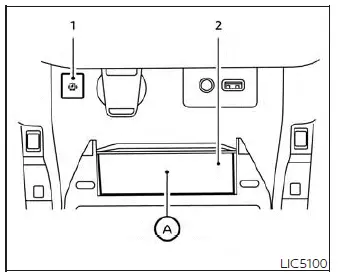
- Status indicator light
- Non-slip charging pad
The integrated wireless charger is located in the front utility bin of the center console of your Nissan Versa. To use it, simply lay your compatible smartphone flat on the rubberized charging pad. The wireless power transfer will begin automatically, providing continuous power to your device as long as the vehicle's ignition switch is turned to the active ON position.
NOTE:
For safety and energy conservation, the wireless charger in your Nissan Versa requires all passenger doors to be fully closed before it begins transmitting power. Opening any door during operation will temporarily suspend the charging process.
WARNING
- Never place coins, keys, foil, or any other metallic materials between the wireless charging pad and your smartphone, as this can cause rapid heat buildup and pose a fire hazard.
- The electromagnetic fields generated by the wireless charger may affect some medical devices. Those who use a cardiac pacemaker or other active implantable medical equipment should consult their medical device manufacturer to determine any possible risks before using this system.
- Never cover the smartphone with a cloth, paper, or clothing while charging, as this traps heat and can cause the device or the vehicle console to overheat.
- Never attempt to charge a smartphone if the device or the charging pad is wet or damp.
- Do not use the wireless charging tray as a general storage spot for small loose items like your Nissan Versa Intelligent Key, USB flash drives, or paperclips.
CAUTION
- Do not place credit cards, transit passes, or any cards utilizing RFID/NFC smart technology on the pad while charging. The magnetic induction fields can corrupt the data stored on these cards or demagnetize their stripes.
- To prevent scratches or charging interruptions, do not operate the wireless charger if dust, grit, or debris has accumulated on the surface of the charging pad.
- Avoid dropping items onto or striking the protective surface of the wireless charger assembly.
- In the event of a liquid spill (such as water, coffee, or sodas) on the charging pad, immediately wipe it dry with a soft cloth and avoid turning on the system.
- Never use harsh cleaning agents, grease, motor oil, or rubbing alcohol to clean the charging pad, as these can permanently degrade the rubber surface.
Wireless charger indicator
The integrated status indicator light ( 1 ) will glow orange as soon as a compatible device is successfully detected and the wireless charging process starts.
Once your smartphone has reached full battery capacity, the indicator light will turn green to signal that charging is complete.
Should an alignment error or a system malfunction occur during operation, the indicator light will flash orange for approximately 8 seconds and then shut off completely to protect the system.
Wireless charger operation
To establish a reliable connection, the smartphone must be aligned flat and centered on the charging pad. To maximize charging performance in your Nissan Versa, ensure the center of your phone is positioned directly over the "Qi" logo A. Because the exact location of the wireless receiver coil varies by phone manufacturer, you may need to adjust the position of your device slightly to find the optimal charging sweet spot.
Thick phone cases, magnetic mounts, and ring-holder accessories can significantly degrade or block wireless power transfer. It is highly recommended to remove protective cases before placing your phone on the charging pad.
To prevent your phone from sliding out of alignment, turn off the phone's vibration and haptic feedback settings before initiating wireless charging.
NOTE:
- This system is compatible only with mobile devices that adhere to the established Qi wireless charging standard.
- It is normal for your smartphone to feel warm during wireless charging. If the temperature rises excessively, the built-in thermal protection in your Nissan Versa wireless charger may suspend power transfer. This is a normal safety function, not a malfunction. If charging stops, remove the phone, let it cool down, and then resume charging. The indicator will flash orange and shut off when this thermal protection is active.
- Wireless charging speed and cycles may be limited or paused automatically by your smartphone's internal battery management systems (due to battery temperature, state of charge, etc.).
- If you experience static or noise on your vehicle's AM/FM radio during charging, try repositioning your smartphone precisely over the center ("Qi" logo) of the pad.
- The wireless charging transmission will pause momentarily when the vehicle's onboard security system is actively searching for the Nissan Versa Intelligent Key.
- The wireless charging pad will not operate if a physical USB charging cable is already connected to your smartphone. While the indicator may turn orange or flash when a cabled phone is placed on the pad, wireless power transfer will be bypassed.
- Depending on individual smartphone software and communication protocols, the indicator light on the console may remain lit in orange even after your device indicates a 100% full charge.
This device complies with part 15 of the FCC Rules and RSS-Gen of IC Rules.
Operation is subject to the following two conditions:
(1) This device may not cause harmful interference, and
(2) This device must accept any interference received, including interference that may cause undesired operation.
Changes or modifications not expressly approved by the party responsible for compliance could void the user's authority to operate the equipment.
RF Radiation Exposure Statement: This equipment complies with FCC RF Radiation exposure limits set forth for an uncontrolled environment.
This device and its antenna must not be co-located or operating in conjunction with any other antenna or transmitter.
This equipment should be installed and operated with a minimum distance of 15cm between the radiator and your body.
ISED Compliance Statement
This device complies with RSS-Gen of IC Rules
Operation is subject to the following two conditions:
(1) This device may not cause harmful interference, and
(2) This device must accept any interference received, including interference that may cause undesired operation.
Changes or modifications made to this device, not expressly approved by LG Vehicle Components Company, will void the user's authority to operate the equipment.
ISED RF Radiation Exposure Statement: This equipment complies with ISED RF Radiation exposure limits set forth for an uncontrolled environment. This device and its antenna must not be co-located or operating in conjunction with any other antenna or transmitter. This equipment should be installed to operate with a minimum distance of 15 cm between the radiator and the end-user's body and arms.
```