
NISSAN Intelligent Key™ (if so equipped)
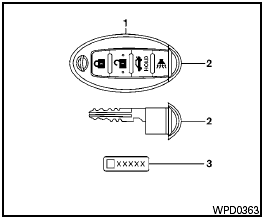
NISSAN Intelligent Key™
1. Two Intelligent Keys
2. Mechanical keys (inside Intelligent Keys)
3. Key number plate
Your vehicle can only be driven with the Intelligent Keys which are registered to your vehicle’s Intelligent Key components and NISSAN Vehicle Immobilizer System components.
See also:
Heated seat (if so equipped)
Heated seat (if so equipped)
The front seats are warmed by built-in heaters.
1. Start the engine.
2. Push the low or high position of the switch,
as desired, depending on the temperature.
The ...
Auto relock
When the button on the keyfob is pressed,
all doors will lock automatically within 1 minute
unless one of the following operations is performed.
● Any door is opened.
● A key is ins ...
Switch operation
The windshield wiper and washer switch operates
when the ignition switch is placed in the ON
position.
Push the lever down to operate the wiper at the
following speed:
1 Intermittent — interm ...