
Opening the trunk lid
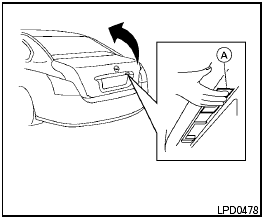
Opening the trunk lid
1. Push the trunk opener request switch A for more than 1 second while carrying the Intelligent Key with you.
2. The trunk will unlatch. A chime will sound 4 times.
3. Raise the trunk lid to open the trunk.
See also:
2011 Nissan Juke review By Warren Brown
It's a bug-eyed, bubble-butt car, perhaps the ugliest compact automobile ever
made.
It's perfect fare for a review on Halloween, a car that resembles a
hunchbacked bat or an evil mouse in transl ...
Light reminder chime
The light reminder chime will sound when the
driver side door is opened with the light switch
in the or
position, and the ignition
switch is in the ACC, OFF or LOCK position.
Turn the light ...
Operating range
Operating range
The Intelligent Key functions can only be used
when the Intelligent Key is within the specified
operating range from the request switch 1 .
When the Intelligent Key battery is ...