
Setting hazard indicator and horn mode
This vehicle is set in hazard indicator and horn mode when you first receive the vehicle.
In hazard indicator and horn mode, when the
LOCK  button 1 is pushed, the
hazard
indicator flashes twice and the horn chirps once.
button 1 is pushed, the
hazard
indicator flashes twice and the horn chirps once.
When the UNLOCK  button 2 is
pushed,
the hazard indicator flashes once.
button 2 is
pushed,
the hazard indicator flashes once.
If the horn chirp is not necessary, you can switch to hazard indicator only mode by following the switching procedure.
In hazard indicator only mode, when the LOCK
button is pushed, the hazard
indicator
flashes twice. When the UNLOCK
button is
pushed, neither the hazard indicator nor the horn
operates.

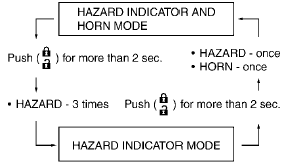
Switching procedure:
To switch the hazard indicator and horn operation, push the LOCK 1 and UNLOCK 2 buttons on the keyfob simultaneously for more than 2 seconds.
- When the hazard indicator mode is set, the hazard indicator flashes 3 times.
- When the hazard indicator and horn mode is set, the hazard indicator flashes once and the horn chirps once.
See also:
Vehicle phonebook
This vehicle has two phonebooks available for
your use. Depending on your phone, the system
may automatically download your entire cell
phone’s phonebook into the “Handset Phonebook”.
For ...
Power steering
The power assisted steering uses a hydraulic
pump, driven by the engine, to assist steering.
If the engine stops or the drive belt breaks, you
will still have control of the vehicle. However,
m ...
Tire labeling
Example
Federal law requires tire manufacturers to
place standardized information on the
sidewall of all tires. This information identifies
and describes the fundamental
characteristics of ...