
Front-side view
Front-side view
Guiding lines:
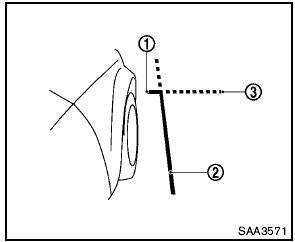
Guiding lines that indicate the width and the front end of the vehicle are displayed on the monitor.
The front-of-vehicle line 1 shows the front part of the vehicle.
The side-of-vehicle line 2 shows the vehicle width including the outside mirror.
The extensions 3 of both the front 1 and side 2 lines are shown with a green dotted line.

- There is a plastic cover over the camera. Do not scratch the cover when cleaning dirt or snow from the cover.
- The turn signal light may overlap with the side-of-vehicle line. This is not a malfunction.
See also:
Checking engine oil level
1. Park the vehicle on a level surface and apply
the parking brake.
2. Run the engine until it reaches operating
temperature.
3. Turn off the engine. Wait more than 10
minutes for the oil to ...
Heater and air conditioner (automatic) (Type A)
1. Temperature control buttons (drivers
side)
2. AUTO climate control ON button
3. (front defroster) button
4. Air recirculation button
5. MODE (manual air flow control) button
6. Tempe ...
Care of wheels
See “Cleaning exterior” in the “7. Appearance
and care” section for details about care of the
wheels. ...