
Compressed Audio Files (MP3/WMA/AAC/ATRAC3)
Explanation of terms:
- MP3 — MP3 is short for Moving Pictures Experts Group Audio Layer 3. MP3 is the most well known compressed digital audio file format. This format allows for near “CD quality” sound, but at a fraction of the size of normal audio files. MP3 conversion of an audio track can reduce the file size by approximately a 10:1 ratio (Sampling: 44.1 kHz, Bit rate: 128 kbps) with virtually no perceptible loss in quality. The compression reduces certain parts of sound that seem inaudible to most people.
- WMA — Windows Media Audio (WMA) is a compressed audio format created by Microsoft as an alternative to MP3. The WMA codec offers greater file compression than the MP3 codec, enabling storage of more digital audio tracks in the same amount of space when compared to MP3s at the same level of quality.
- AAC/M4A — Advanced Audio Coding (AAC) is a lossy audio compression format.
Audio files that have been encoded with AAC are generally smaller in size and deliver a higher quality of sound than MP3.
- ATRAC3, ATRAC3 Plus - Adaptive Transform Acoustic Coding (ATRAC) is a lossy audio compression format developed by Sony.
- Bit rate — Bit rate denotes the number of bits per second used by a digital music file.
The size and quality of a compressed digital audio file is determined by the bit rate used when encoding the file.
- Sampling frequency — Sampling frequency is the rate at which the samples of a signal are converted from analog to digital (A/D conversion) per second.
- Multisession — Multisession is one of the methods for writing data to media. Writing data once to the media is called a single session, and writing more than once is called a multisession.
- ID3/WMA Tag — The ID3/WMA tag is the part of the encoded MP3 or WMA file that contains information about the digital music file such as song title, artist, album title, encoding bit rate, track time duration, etc.
ID3 tag information is displayed on the Album/Artist/Track title line on the display.
* Windows® and Windows Media® are registered trademarks or trademarks of Microsoft Corporation in the United States of America and/or other countries.
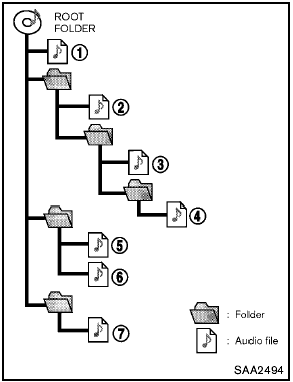
Playback order:
- The folder names of folders not containing compressed audio files are not shown in the display.
- If there is a file in the top level of a disc/USB, “Root Folder” is displayed.
- The playback order is the order in which the files were written by the writing software, so the files might not play in the desired order.
- Music playback order of compressed audio files is as illustrated.
Specification chart (for FM-AM Radio with Compact Disc (CD) player):
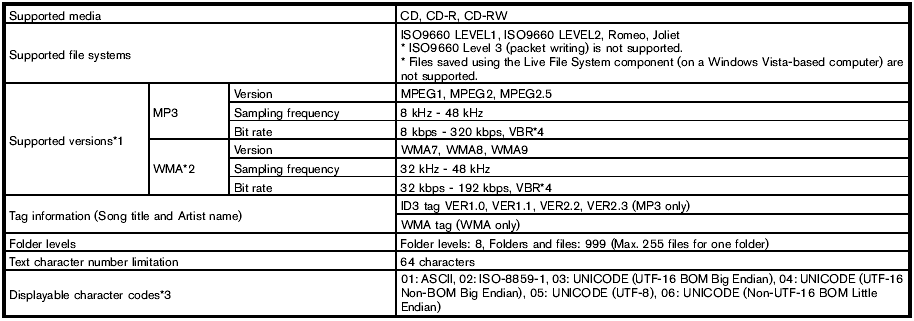
1 Files created with a combination of 48 kHz sampling frequency and 64 kbps bit rate cannot be played.
2 Protected WMA files (DRM) cannot be played.
3 Available codes depend on what kind of media, versions and information are going to be displayed.
4 When VBR files are played, the playback time may not be displayed correctly.
Specification chart (for FM-AM-SAT Radio with Compact Disc (CD) Player (Type A)):
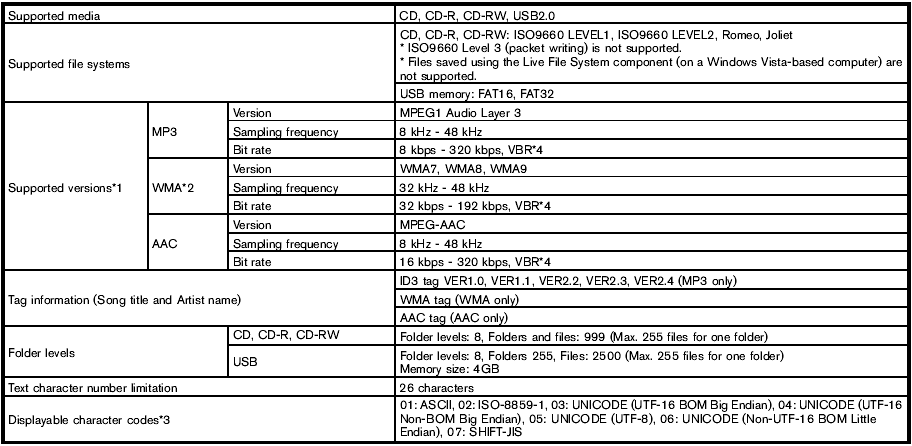
1 Files created with a combination of 48 kHz sampling frequency and 64 kbps bit rate cannot be played.
2 Protected WMA files (DRM) cannot be played.
3 Available codes depend on what kind of media, versions and information are going to be displayed.
4 When VBR files are played, the playback time may not be displayed correctly.
Specification chart (for FM-AM-SAT Radio with Compact Disc (CD) Player (Type B)):
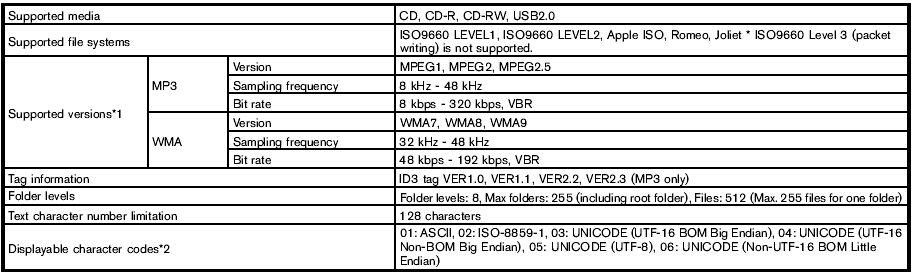
1 Files created with a combination of 48 kHz sampling frequency and 64 kbps bit rate cannot be played.
2 Available codes depend on what kind of media, versions and information are going to be displayed.
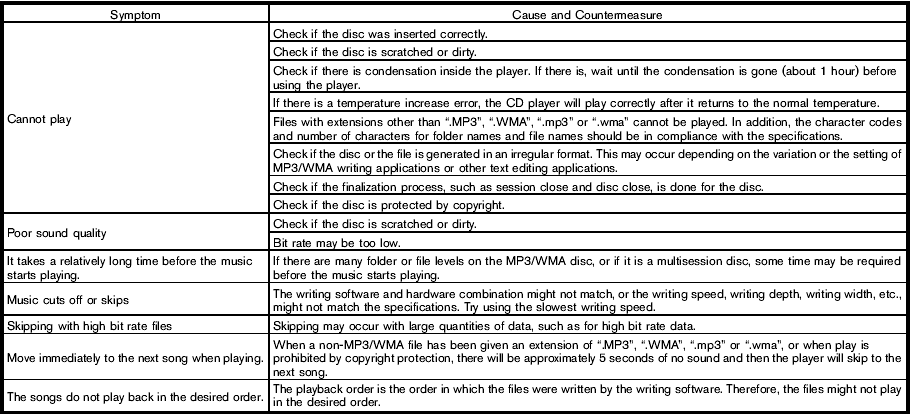
Troubleshooting guide (for FM-AM Radio with Compact Disc (CD) player):
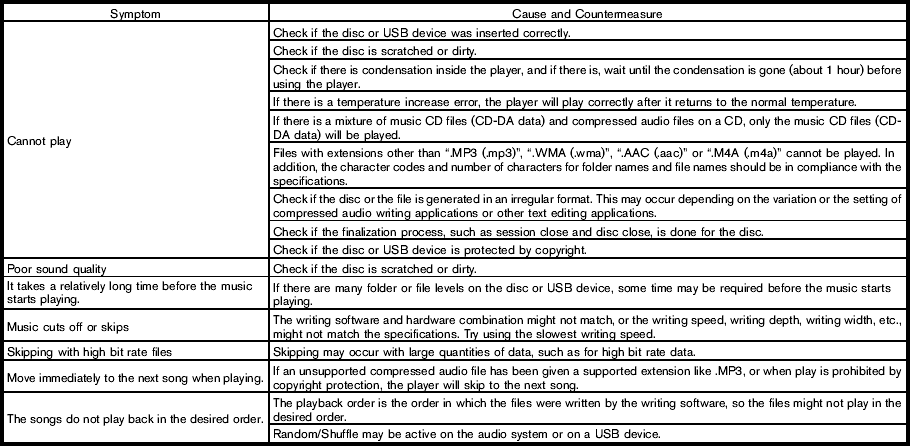
Troubleshooting guide (for FM-AM-SAT Radio with Compact Disc (CD) player (Type A)):
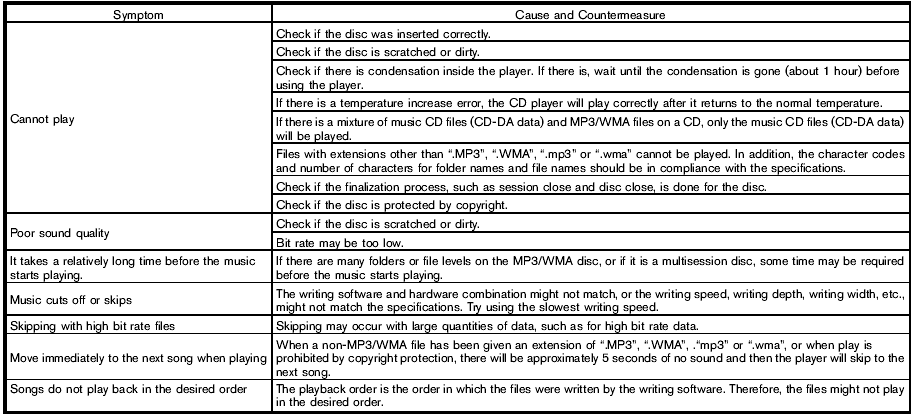
Troubleshooting guide (for FM-AM-SAT Radio with Compact Disc (CD) Player (Type B)):
See also:
Cleaning exterior
In order to maintain the appearance of your vehicle,
it is important to take proper care of it.
To protect the paint surfaces, please wash your
vehicle as soon as you can.
● after a rainfa ...
Oil viscosity
The engine oil viscosity or thickness changes
with temperature. Because of this, it is important
to select the engine oil viscosity based on the
temperatures at which the vehicle will be
opera ...
SENSE AND STYLE
Family Friendly (Not Really, Fair, Great, Excellent): Excellent
Fun-Factor (None, Some, Good Times, Groove-On): Good Times ...