
Headlight beam select
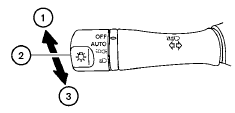
1 To select the high beam function, push the
lever forward. The high beam lights come on
and the  light illuminates.
2 Pull the lever back to select the low beam.
3 Pulling and releasing the lever flashes the headlight high beams on and off.
See also:
How to use the STATUS button
The STATUS button is used to display system
information. Three different split screens of information
are available. Press the STATUS button
multiple times to cycle through these screens as
fo ...
New Frontier PRO-4X Off-Road Model
Frontier's all-new PRO-4X trim offers drivers outstanding off-road
flexibility, pairing Frontier's already impressive list of standard equipment
features with the PRO-4X's off-road performance enh ...
Tire pressures
- When towing a trailer, inflate the vehicle
tires to the recommended cold tire pressure
indicated on the Tire and Loading Information
label.
- Trailer tire condition, size, load rating and
p ...